

Introduction: Why Images Needed a Brain, Not Just a Sensor
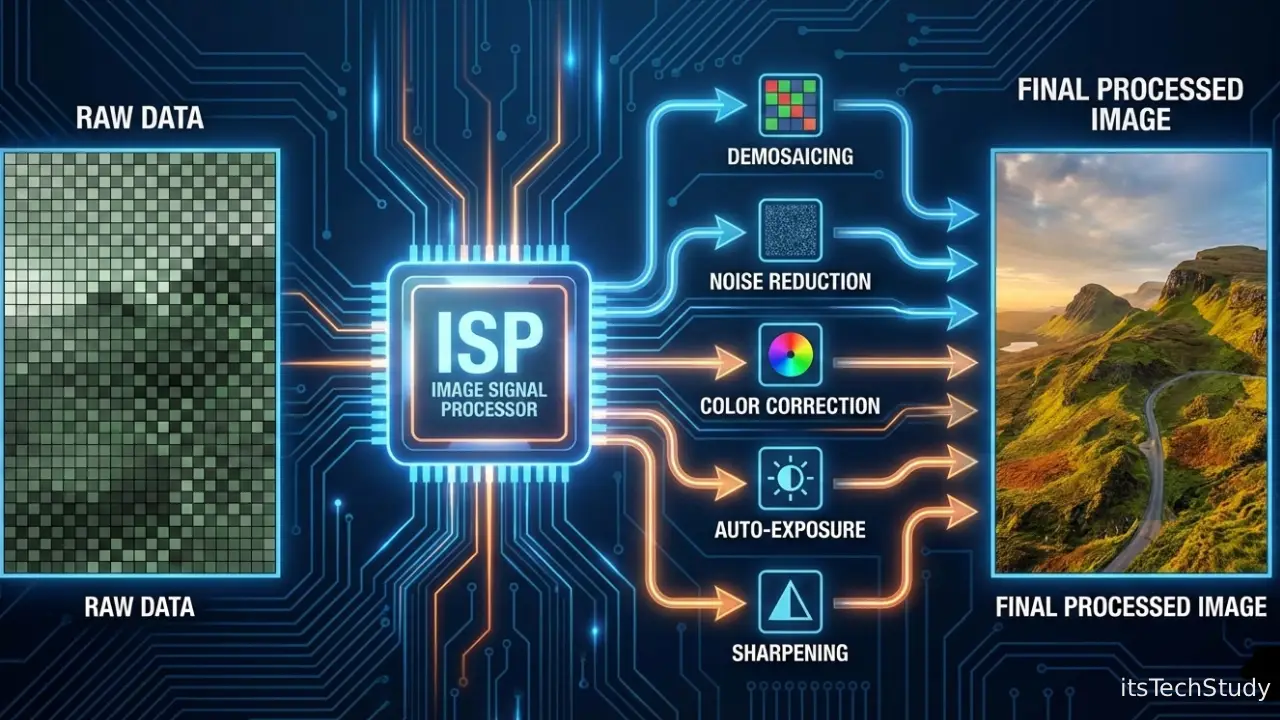
Not long ago, cameras were simple. A sensor captured light, a lens focused it, and what you saw was mostly what you got. But as smartphones replaced traditional cameras and imaging moved into everything-from drones and cars to medical devices and smart homes-the old approach stopped working. Raw sensor data is messy, noisy, and completely unsuitable for human eyes or machine vision systems.
This is where the ISP (Image Signal Processor) stepped in and quietly became one of the most critical components in modern technology.
Today’s users expect stunning photos in low light, accurate colors, instant HDR, and smooth video-often from a device thin enough to slip into a pocket. At the same time, AI systems rely on clean, well-processed images for tasks like facial recognition, autonomous driving, and industrial inspection. The challenge? Sensors alone can’t deliver that level of quality.
An Image Signal Processor acts as the bridge between raw data and usable images. It transforms unstructured light information into clear, accurate, and visually pleasing output. Despite its importance, the ISP rarely gets attention outside engineering circles. This article changes that.
By the end, you’ll understand what an ISP is, how it works, why it matters, and where this technology is headed next.
What Is an ISP (Image Signal Processor)?
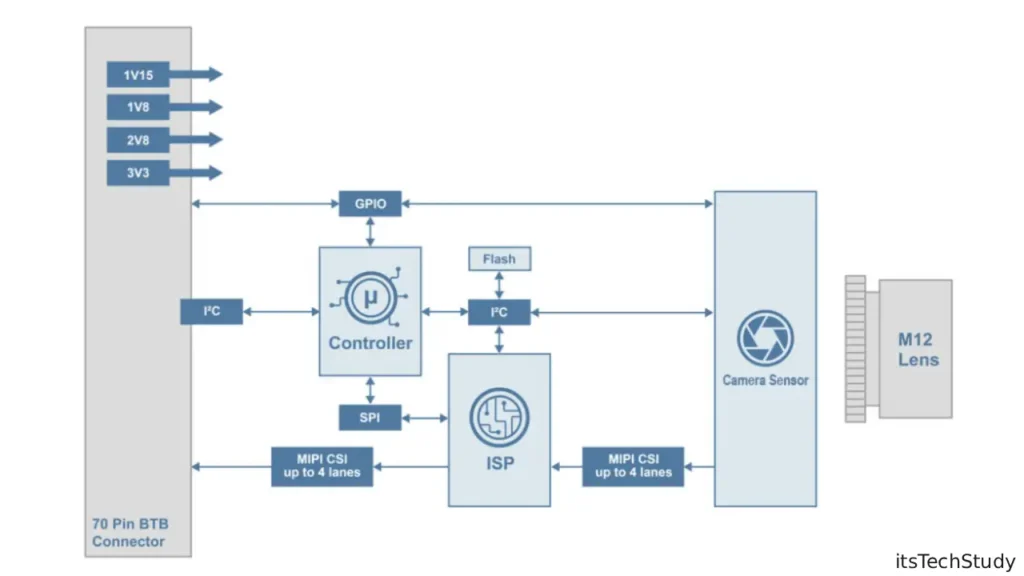
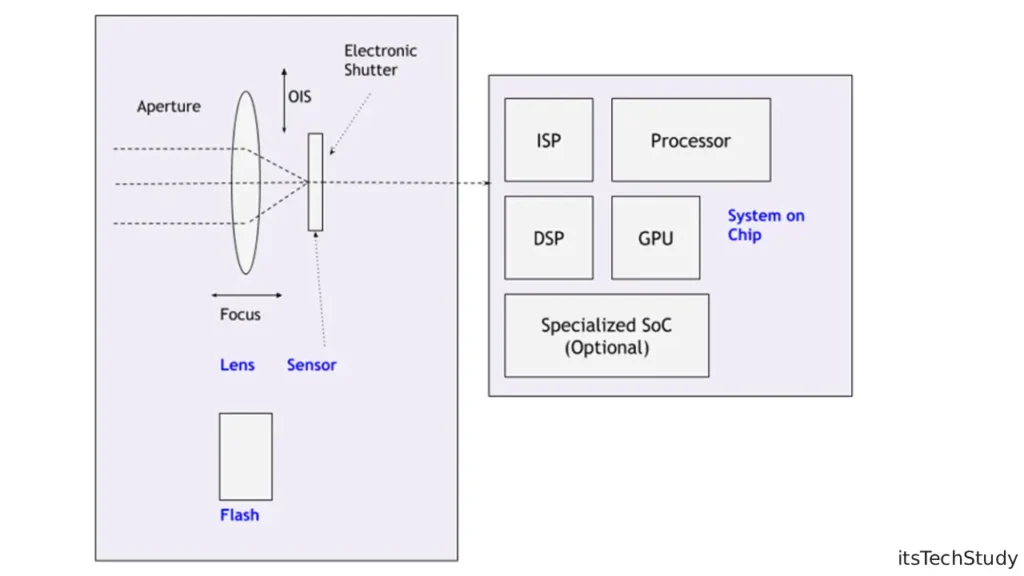
An Image Signal Processor (ISP) is a specialized hardware or software component that processes raw image data from an image sensor and converts it into a final image or video that humans or machines can use.
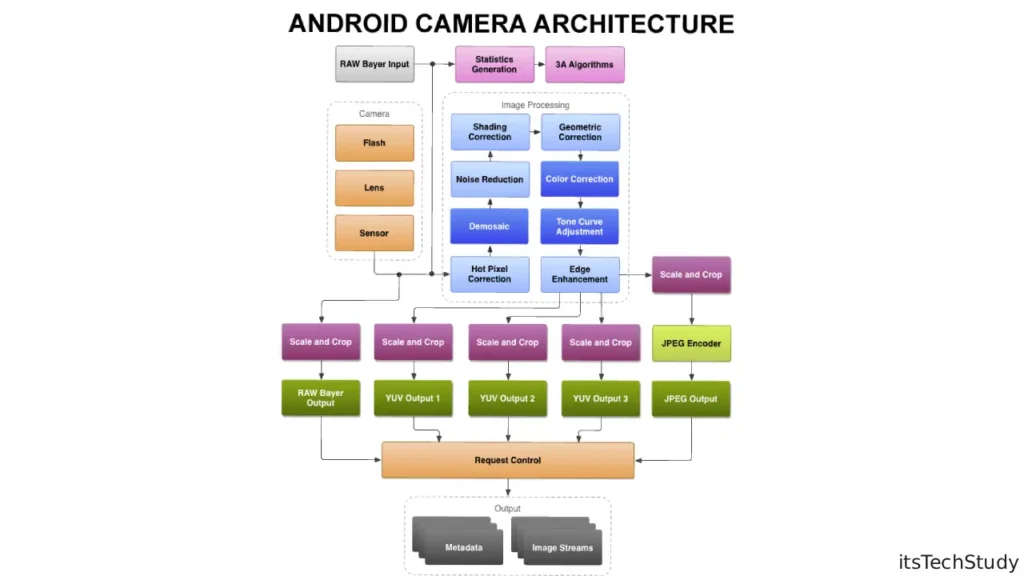
When a camera sensor captures light, it doesn’t create a ready-made photo. Instead, it produces raw data-often a mosaic of brightness values with noise, distortion, and incomplete color information. The ISP takes this raw input and performs dozens of complex operations to produce a clean, balanced, and correctly colored image.
In simple terms:
The sensor captures light. The ISP turns it into a picture.
Where ISPs Are Used Today
ISPs are everywhere, even if you don’t see them:
- Smartphones and tablets
- Digital cameras and action cams
- Laptops and webcams
- Autonomous vehicles and ADAS systems
- Drones and robotics
- Medical imaging devices
- Smart surveillance and security cameras
As imaging becomes more central to technology, the role of the ISP keeps expanding.
How an Image Signal Processor Works (Step-by-Step)
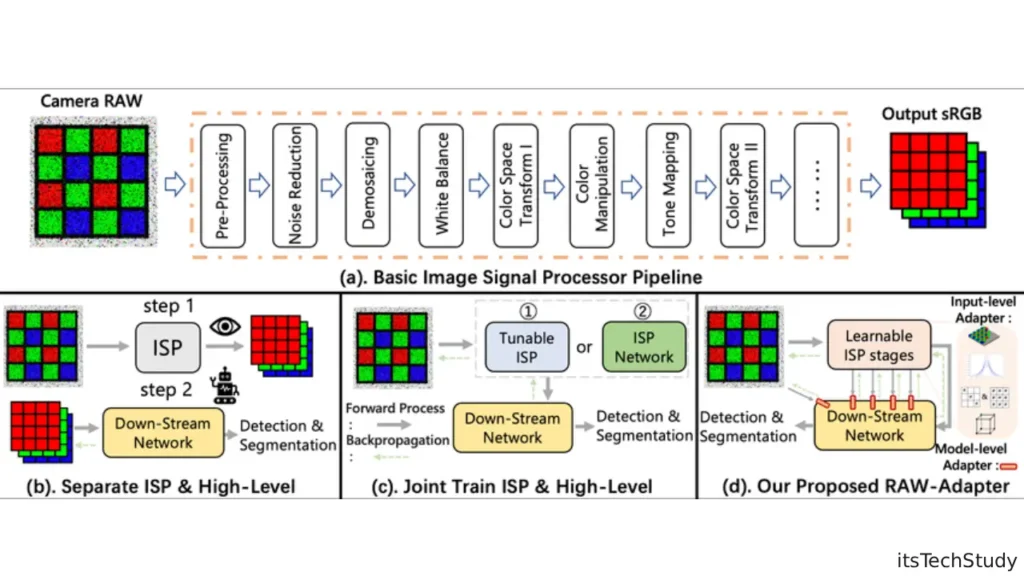
Understanding the ISP is easier when you break it down into stages. While implementations vary, most ISPs follow a similar processing pipeline.
1. Raw Data Acquisition
The image sensor captures light using millions of pixels. Each pixel measures brightness, but not full color. Most sensors use a Bayer filter, meaning each pixel records only red, green, or blue information.
At this stage, the image looks nothing like a photograph-just raw numerical data.
2. Demosicing (Color Reconstruction)
Since each pixel only sees one color, the ISP reconstructs full RGB values for every pixel by analyzing neighboring pixels. This process is called demosaicing.
Good demosaicing preserves fine details and avoids artifacts like color fringing or false patterns.
3. Noise Reduction
Low light, heat, and sensor limitations introduce noise. The ISP applies advanced noise reduction algorithms to clean the image without destroying texture or detail.
Modern ISPs often use:
- Spatial noise reduction
- Temporal noise reduction (for video)
- AI-based denoising models
4. White Balance and Color Correction
Different lighting conditions affect color temperature. The ISP adjusts white balance so whites look white and colors appear natural.
Color correction matrices then map sensor colors to standardized color spaces like sRGB or Display P3.
5. Exposure, HDR, and Tone Mapping
To handle bright highlights and dark shadows, ISPs manage:
- Auto exposure
- Multi-frame HDR merging
- Tone mapping for natural contrast
This is why modern phones can capture sunsets and night scenes so well.
6. Sharpening and Final Output
Finally, the ISP enhances edges, adjusts contrast, and prepares the image for display or storage in formats like JPEG, HEIF, or RAW.
Hardware ISP vs Software ISP
Not all ISPs are built the same. They generally fall into two categories.
Hardware-Based ISP
These are dedicated circuits optimized for speed and power efficiency.
Common in:
- Smartphone SoCs
- Digital cameras
- Embedded systems
Advantages:
- Real-time processing
- Low power consumption
- Consistent performance
Software-Based ISP
These rely on CPUs, GPUs, or NPUs and are more flexible.
Common in:
- Computational photography apps
- Custom camera pipelines
- Research and prototyping
Advantages:
- Easier updates
- Advanced AI algorithms
- Greater customization
Most modern devices use a hybrid approach, combining hardware ISP with software and AI acceleration.
ISP vs GPU vs NPU: What’s the Difference?
| Component | Primary Role | Strengths | Limitations |
|---|---|---|---|
| ISP | Image processing | Real-time, low power, camera-specific | Less flexible |
| GPU | Parallel graphics & compute | High throughput | Higher power usage |
| NPU | AI inference | Machine learning tasks | Not image-specific |
The ISP handles core imaging tasks, while GPUs and NPUs increasingly assist with AI-enhanced features like portrait mode and scene detection.
Why ISPs Matter More Than Ever
Smartphones Changed Everything
Smartphone cameras forced ISPs to evolve rapidly. Tiny sensors, fixed lenses, and limited light demanded smarter processing instead of bigger hardware.
This led to :
- Multi-frame image stacking
- Computational HDR
- AI-based scene optimization
AI and Computer Vision Depend on ISPs
In autonomous driving and robotics, a poorly processed image can mean bad decisions. ISPs now optimize images not just for humans, but for machine vision models.
Clean input data improves:
- Object detection
- Facial recognition
- Depth estimation
Pros and Cons of Image Signal Processors
Pros
- Enables high-quality images from small sensors
- Real-time processing for photos and video
- Power-efficient compared to general-purpose compute
- Essential for AI-driven imaging features
Cons
- Hardware ISPs are less flexible
- Quality varies by manufacturer
- Advanced features can increase cost
- Over-processing may reduce natural look
Understanding these trade-offs helps manufacturers and developers choose the right ISP strategy.
ISP in Smartphones: The Real Differentiator
Two phones can use the same camera sensor but produce very different results. Why? The ISP.
Manufacturers invest heavily in custom ISP tuning:
- Color science
- Skin tone accuracy
- Night mode performance
- Video stabilization
This is why camera quality isn’t just about megapixels-it’s about processing intelligence.
Emerging Trends in ISP Technology
AI-Powered ISPs
Machine learning models are now embedded directly into ISP pipelines to improve:
- Denoising
- Super-resolution
- Semantic segmentation
Computational Photography
ISPs increasingly handle:
- Multi-frame fusion
- Depth mapping
- Real-time background blur
Automotive and Edge AI
In vehicles, ISPs must process multiple camera streams with low latency and extreme reliability-often in harsh lighting conditions.
Common ISP Use Cases Explained
- Night photography: Multi-frame noise reduction and exposure stacking
- HDR video: Real-time tone mapping at high frame rates
- Medical imaging: Accurate color and contrast for diagnostics
- Security cameras: Clear images in low light and motion
Each use case pushes ISPs in different technical directions.
Conclusion: The Silent Powerhouse of Modern Imaging
The ISP (Image Signal Processor) may be invisible to users, but it defines how we see the digital world. From breathtaking smartphone photos to life-saving medical scans and autonomous vehicles, ISPs quietly transform raw light into meaningful information.
As sensors shrink and expectations grow, the future of imaging won’t depend solely on better hardware-but on smarter, more adaptive image signal processing. Whether you’re a tech enthusiast, developer, or industry professional, understanding the ISP gives you a deeper appreciation of how modern imaging truly works.

About the Author
Tobias Hale is a technology writer and software analyst with a sharp eye on the ever-evolving world of digital innovation. With a deep passion for clean code, secure systems, and emerging technologies, Tobias brings clarity to complex topics - from the latest in operating system updates to cutting-edge software security practices.
FAQs About ISP (Image Signal Processor)
Q1: Is an ISP the same as a camera sensor?
Ans: No. The sensor captures light, while the ISP processes that data into a usable image. Both are essential but serve different roles.
Q2: Can a better ISP improve an average camera sensor?
Ans: Absolutely. A strong ISP can significantly enhance image quality, even with modest hardware.
Q3: Why do phones with similar specs have different camera results?
Ans: Because ISP algorithms, tuning, and AI enhancements vary widely between manufacturers.
Q4: Does an ISP affect video quality too?
Ans: Yes. ISPs handle stabilization, noise reduction, HDR, and frame consistency in video.
Q5: Are ISPs used in AI and machine vision?
Ans: Yes. Clean, well-processed images improve the accuracy of computer vision and AI models.





No Comments Yet
Be the first to share your thoughts.
Leave a Comment