

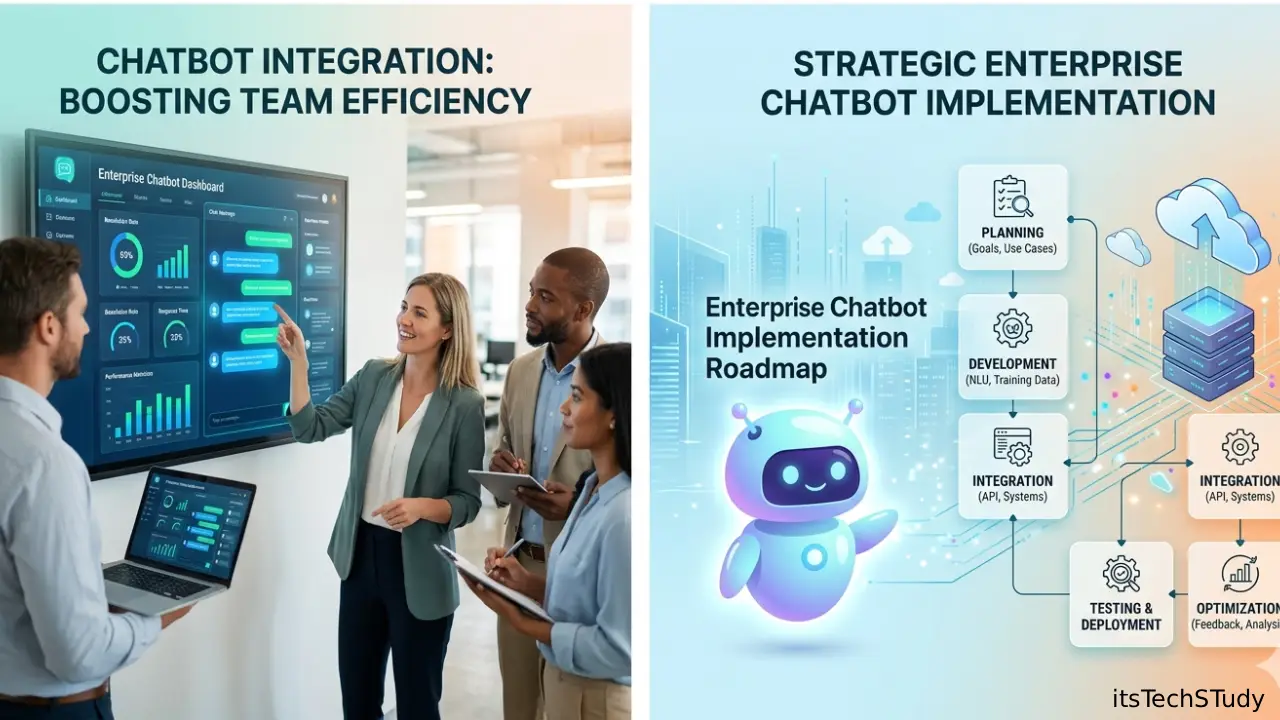
Introduction: Why Enterprise Chatbot Implementation Matters More Than Ever
A few years ago, most businesses treated chatbots like a side project. They were simple FAQ tools, often rule-based, usually stuck on a website widget, and rarely connected to the systems that actually run the company. That worked for basic customer support, but it did not solve the bigger enterprise problem: teams were overwhelmed, support costs kept climbing, and customers expected instant, personalized help across every channel.
Fast forward to 2026, and the conversation has changed completely.
Today, enterprise chatbot implementation is no longer about launching a bot just to say you use AI. It is about building a reliable, secure, and measurable layer of conversational AI that can sit on top of customer service, HR, IT help desks, sales workflows, knowledge bases, and internal operations. In other words, the modern enterprise chatbot is becoming part of the digital infrastructure, not just a feature.
That shift is happening because enterprises are under pressure from every direction: rising service expectations, tighter budgets, fragmented data, stricter governance requirements, and executive demand for measurable ROI. Microsoft notes that the era of AI experimentation is over and enterprises are now prioritizing solutions that prove value quickly, while Salesforce reports AI implementation surged 282% year over year in its 2025 CIO study as organizations moved from pilots to scale. Gartner also predicts that by the end of 2026, 40% of enterprise applications will include task-specific AI agents, up from less than 5% in 2025.
That is exactly why this guide matters.
If you are planning an enterprise chatbot strategy, launching an AI customer support chatbot, or evaluating chatbot integration with CRM and ERP systems, this article will walk you through the real-world implementation process-without hype, fluff, or vague advice.
What Is Enterprise Chatbot Implementation?
Enterprise chatbot implementation is the process of planning, building, integrating, securing, deploying, and continuously improving a chatbot or AI assistant designed for business-scale operations.
Unlike consumer bots or basic website chat widgets, an enterprise chatbot typically needs to:
- Connect with internal systems like CRM, ERP, HRMS, ITSM, and knowledge bases
- Support multiple channels such as web, mobile, WhatsApp, Slack, or Microsoft Teams
- Handle authentication and user permissions
- Follow governance, privacy, and compliance rules
- Escalate to human agents when needed
- Track measurable outcomes like containment rate, CSAT, cost savings, and resolution time
IBM defines enterprise chatbots as AI-powered conversational systems used by organizations to automate tasks, answer questions, and support customers or employees by integrating with enterprise data, applications, and workflows. IBM also highlights that security, scalability, multilingual support, and deep API integration are what distinguish enterprise-grade deployments from basic bots.
In short, enterprise chatbot implementation is not just about conversation design. It is about business process automation with guardrails.
Why Enterprises Are Investing in Chatbots in 2026
The biggest reason is simple: businesses are tired of AI demos that never become production systems.
In 2026, enterprises want solutions that reduce workload, improve service quality, and fit into existing workflows. Microsoft’s enterprise trend analysis says CIOs and CFOs are cutting tools that never moved past pilots, while IBM notes many generative AI and RAG projects stalled because the data foundation was not ready for production.
Top drivers behind enterprise chatbot adoption
- Customer support cost reduction
Routine queries like order status, password resets, billing questions, and policy lookups can be automated. - 24/7 service availability
Enterprises need support beyond business hours without scaling headcount linearly. - Employee self-service
HR, IT, and operations teams can offload repetitive requests. - Faster internal workflows
Employees can ask for information or trigger actions without jumping across multiple tools. - Better data access
Chatbots can surface information from knowledge bases, CRMs, and analytics platforms in natural language. - Scalable digital transformation
Chat becomes a user interface layer for complex systems.
Common Enterprise Chatbot Use Cases
Before you choose a platform or model, define the use case clearly. This is where many implementations go wrong.
Customer-facing use cases
- Customer support automation
- Order tracking and delivery updates
- Product recommendations
- Subscription or account management
- Lead qualification and demo booking
- Billing and payment support
Employee-facing use cases
- IT help desk support
- Password reset guidance
- HR policy Q&A
- Leave and payroll inquiries
- Employee onboarding
- Internal knowledge retrieval
Operations and business workflow use cases
- CRM data lookup
- Ticket triage and routing
- Inventory checks
- Sales enablement support
- Knowledge management access
- Multi-step workflow automation
IBM specifically calls out customer onboarding, customer support, employee support, data access, and sales assistance as major enterprise chatbot use cases.
Enterprise Chatbot Implementation Roadmap
This is the part most decision-makers actually need: a realistic rollout framework.
1) Start With One High-Value Problem
Do not start with “we want an AI chatbot for everything.”
Instead, identify:
- A repetitive workflow
- High ticket volume
- Clear business pain
- Structured or semi-structured data source
- A measurable KPI
Best first projects
- IT support bot for common employee requests
- Customer support bot for tier-1 FAQs
- Sales qualification bot on website
- HR policy assistant for internal teams
Pro tip: Your first implementation should solve a narrow but visible problem.
2) Audit Your Data Before You Build
A chatbot is only as useful as the information it can access.
Ask these questions:
- Is the knowledge base current?
- Are documents duplicated or outdated?
- Is content structured consistently?
- Are permissions mapped correctly?
- Is sensitive data separated?
- Do we have APIs for the systems we need?
IBM notes that many AI systems stall in production because data is fragmented across silos and often lacks the structure, metadata, and governance needed for enterprise AI.
Data sources often used in enterprise chatbot integration
- Help center / knowledge base
- CRM (Salesforce, HubSpot, Dynamics)
- ERP systems
- ITSM tools (ServiceNow, Jira Service Management)
- HR systems (Workday, SAP SuccessFactors)
- Document repositories (SharePoint, Confluence, Google Drive)
- Product documentation
- Internal SOPs and policy libraries
3) Choose the Right Chatbot Architecture
In 2026, most enterprise bots are not purely rule-based anymore.
Common architecture options
| Architecture Type | Best For | Pros | Cons |
|---|---|---|---|
| Rule-Based Chatbot | FAQs, simple flows | Predictable, easy to control | Limited flexibility |
| NLP Intent Bot | Structured service requests | Better intent handling | Needs training and maintenance |
| RAG-Based Chatbot | Knowledge retrieval | Good for docs and policies | Depends heavily on data quality |
| Agentic / Workflow Bot | Multi-step business tasks | Can take action across systems | Higher governance and risk |
| Hybrid Model | Most enterprises | Balanced control + flexibility | More implementation complexity |
Recommended 2026 approach
For most enterprises, the best path is a hybrid enterprise chatbot:
- Rule-based flows for critical tasks
- RAG for knowledge retrieval
- Human handoff for edge cases
- Limited workflow automation for approved actions
This gives you speed without sacrificing trust.
4) Prioritize Security, Governance, and Compliance From Day One
This is where enterprise chatbot projects either earn executive support-or get blocked.
Microsoft warns that AI adoption introduces risks such as shadow AI, prompt injection, and regulatory exposure, especially as organizations scale AI into real business operations.
Security checklist for enterprise chatbot implementation
- Role-based access control (RBAC)
- SSO integration (Okta, Azure AD, Google Workspace)
- Audit logs
- Data encryption in transit and at rest
- Prompt injection defenses
- PII redaction
- Human approval for sensitive actions
- Output filtering and moderation
- Environment separation (dev, staging, prod)
- Vendor risk review
Compliance considerations
Depending on your industry, review:
- GDPR
- HIPAA
- SOC 2
- ISO 27001
- PCI DSS
- Internal legal and retention policies
Non-negotiable rule
If your chatbot can access or act on sensitive systems, it needs:
- Explicit permissions
- Traceability
- Fallback behavior
- Kill switch / rollback plan
5) Design Conversations Like a Product, Not a Script
A lot of enterprise chatbots fail because they are technically capable but frustrating to use.
Good conversational design includes:
- Clear expectations (“I can help with billing, orders, and account changes”)
- Guided prompts for common tasks
- Short answers with expandable detail
- Easy escalation to human support
- Clarifying questions only when necessary
- Visible confidence boundaries (“I’m not fully sure-let me connect you to an agent”)
Best practice
Never pretend the bot knows everything.
Users trust a chatbot more when it:
- Admits uncertainty
- Shows sources internally when possible
- Hands off gracefully
- Preserves conversation context
6) Integrate With Human Support, Don’t Replace It
This is one of the most important principles in enterprise chatbot implementation.
The goal is not to eliminate human teams. The goal is to remove repetitive work so humans can handle complex, high-value, or sensitive issues.
IBM highlights seamless handoffs to human teams with full context as a key benefit of enterprise chatbots.
A strong human handoff should include:
- Conversation transcript
- User identity and account context
- Detected intent
- Relevant system data pulled so far
- Priority / sentiment signal
- Recommended next action
This prevents customers and employees from repeating themselves-one of the fastest ways to destroy trust.
7) Define Success Metrics Before Launch
If you cannot measure it, leadership will eventually question it.
Core KPIs for enterprise chatbot ROI
- Containment rate (how many conversations are resolved without human help)
- First response time
- Average handling time reduction
- CSAT / user satisfaction
- Ticket deflection
- Cost per interaction
- Resolution rate
- Escalation quality
- Lead conversion rate (for sales bots)
- Employee productivity gain (for internal bots)
Sample ROI formula
ROI = (Cost savings + revenue impact – implementation cost) ÷ implementation cost
What leaders care about in 2026
Microsoft’s 2026 enterprise AI commentary emphasizes that enterprises now prioritize measurable P&L impact, not vanity metrics. Salesforce also says trust has become a scaling bottleneck, which means outcomes alone are not enough—governance matters too.
Pros and Cons of Enterprise Chatbot Implementation
Pros
- Reduces repetitive support workload
- Improves 24/7 availability
- Scales without proportional hiring
- Speeds up customer and employee response times
- Creates a unified conversational interface across tools
- Can improve consistency and policy adherence
- Supports multilingual service for global teams
- Can boost lead capture and conversion when deployed correctly
Cons
- Poor data quality can cripple performance
- Security and compliance risks are real
- Over-automation can frustrate users
- Integration complexity can be underestimated
- Initial setup may require cross-functional coordination
- Model drift and knowledge freshness need ongoing monitoring
- Executive expectations can be unrealistic if KPIs are unclear
Best Practices for Successful Enterprise Chatbot Deployment
If you want your chatbot to survive beyond the pilot phase, follow these.
10 best practices
- Start narrow, then expand
- Use clean, governed knowledge sources
- Avoid giving the bot unrestricted system access
- Create strong fallback and escalation paths
- Track user feedback inside the chat experience
- Run red-team testing for security and prompt attacks
- Keep legal, IT, and business teams aligned
- Measure business outcomes—not just usage
- Review transcripts regularly for failure patterns
- Treat the chatbot like a product with continuous releases
A Practical 90-Day Enterprise Chatbot Launch Plan
Days 1–15: Discovery and scoping
- Define one priority use case
- Identify stakeholders
- Map systems and data sources
- Set KPIs and compliance constraints
Days 16–35: Data and architecture prep
- Clean and organize knowledge sources
- Choose chatbot platform / LLM strategy
- Design fallback rules
- Define access permissions
Days 36–55: Build and integrate
- Create core flows
- Set up retrieval or API integrations
- Implement SSO, logging, and audit controls
- Configure analytics dashboards
Days 56–70: Testing
- Functional testing
- Hallucination and retrieval quality testing
- Security and prompt injection testing
- Human handoff testing
- Stakeholder review
Days 71–90: Pilot and optimize
- Launch to a limited group
- Collect transcript data
- Fix failure loops
- Tune prompts, policies, and routing
- Expand gradually
Enterprise Chatbot Implementation Trends to Watch in 2026
The space is evolving fast, but a few trends are clearly shaping enterprise adoption.
1. From chatbots to task-specific AI agents
Gartner predicts 40% of enterprise apps will include task-specific AI agents by the end of 2026.
2. ROI is replacing “innovation theater”
Enterprises want production systems with measurable impact, not endless pilots. Microsoft’s 2026 enterprise trend analysis makes that very clear.
3. Trust is now the scaling bottleneck
Salesforce’s CIO research says AI implementation is rising fast, but trust, governance, and safe integration are becoming the real constraints.
4. Data readiness is the hidden success factor
IBM repeatedly points to fragmented, poorly governed data as the reason many AI deployments fail to scale.
5. Governance-first architectures are winning
The most successful enterprise chatbot deployments are not the most “autonomous.” They are the ones with the best controls.
Conclusion: Build for Trust, Not Just Automation
The biggest mistake companies make with enterprise chatbot implementation is treating it like a trendy AI feature instead of a serious business system.
In 2026, the winners are not the organizations with the flashiest demos. They are the ones building secure, governed, measurable conversational AI that actually fits into the flow of work. That means starting with one valuable use case, cleaning the data, integrating carefully, defining guardrails, and measuring ROI from day one.
If you remember just one thing, make it this:
A successful enterprise chatbot is not the one that talks the most—it is the one that solves real business problems reliably, safely, and at scale.
For most businesses, the smartest next step is simple:
- Pick one high-impact workflow
- Launch a controlled pilot
- Track business metrics
- Improve with real usage data
- Expand only after trust is earned
That is how enterprise chatbot projects move from experiment to infrastructure.

About the Author
Amelia Morgan is a Editor at itsTechStudy.com with 15+ years of experience in the technology industry. I write about emerging innovations, AI, and digital trends-making complex topics simple and engaging for readers.
Frequently Asked Questions (FAQ)
Q1: What is the difference between a regular chatbot and an enterprise chatbot?
Ans: A regular chatbot usually handles basic FAQs or scripted website interactions. An enterprise chatbot is built for business-scale use and integrates with systems like CRM, ERP, ITSM, and internal knowledge bases. It also requires security, compliance, analytics, and human escalation capabilities.
Q2: How long does enterprise chatbot implementation take?
Ans: A focused pilot can often launch in 60 to 90 days, especially for a narrow use case like IT help desk or customer FAQ automation. A broader, multi-system rollout may take 3 to 9 months, depending on data quality, integration complexity, compliance reviews, and stakeholder alignment.
Q3: What is the best use case to start with?
Ans: The best first use case is one that is: Repetitive High-volume Low-risk Easy to measure Backed by reliable data Great starting points include IT support, HR policy Q&A, customer support tier-1 inquiries, and lead qualification chatbots.
Q4: Are enterprise chatbots secure enough for sensitive industries?
Ans: Yes-but only when designed correctly. Enterprise chatbots can work in regulated environments if they include: Role-based access Audit logging Data redaction Approval workflows Encrypted data handling Strong vendor governance Limited-action permissions Without those controls, they can introduce serious risk.
Q5: How do you measure chatbot ROI in the enterprise?
Ans: Common ROI indicators include: Ticket deflection Reduced handling time Lower support cost per interaction Faster employee self-service Increased lead conversion Higher CSAT Better agent productivity The key is to connect metrics to actual business outcomes, not just usage volume.
Q6: Can enterprise chatbots replace human agents completely?
Ans: In most cases, no-and they should not try to. The best enterprise chatbot strategy is human + AI, where the chatbot handles repetitive or structured tasks and humans manage exceptions, emotional interactions, sensitive decisions, and complex problem-solving.




No Comments Yet
Be the first to share your thoughts.
Leave a Comment