

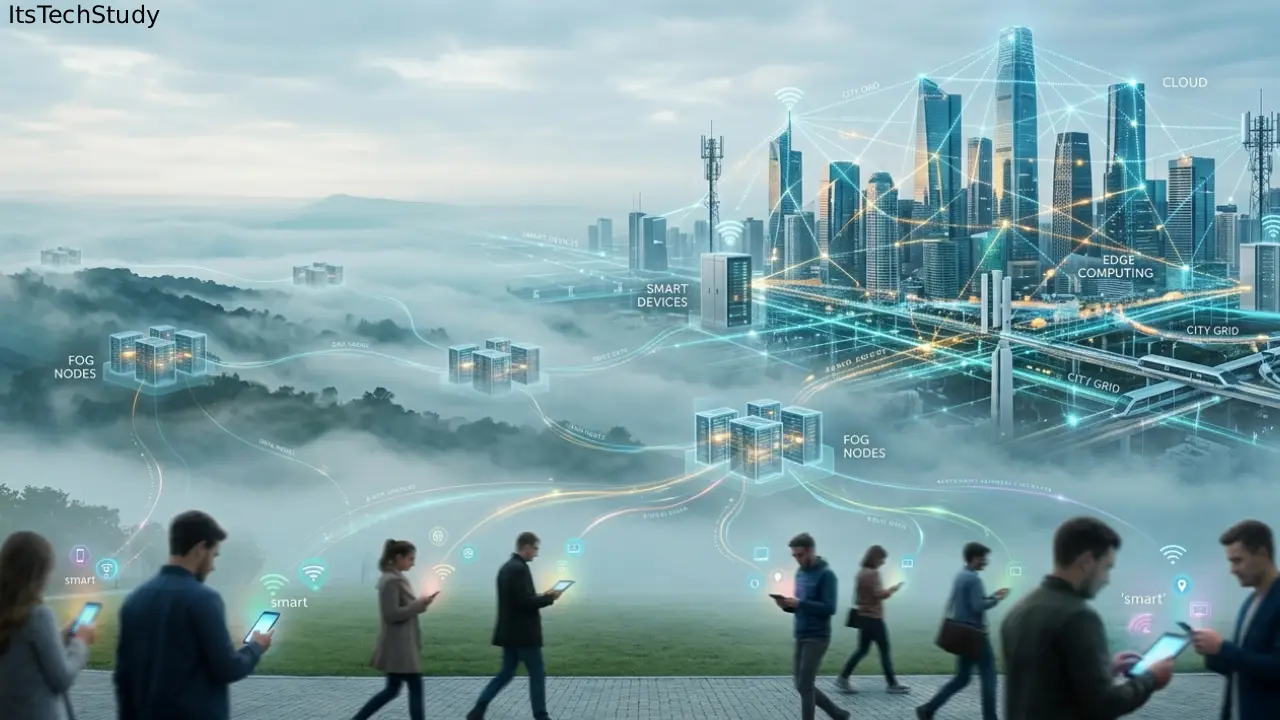
Edge, Fog and Mobile Computing
A few years ago, most developers were comfortable sending everything to the cloud.
Need analytics? Send it to the cloud.
Need AI processing? Cloud again.
Need real-time monitoring? Yep – cloud servers.
And honestly, that worked fine when apps were simpler and internet connections were predictable.
But things changed.
Now we have:
- Smart cameras streaming 24/7
- IoT sensors generating millions of events
- Mobile apps expecting instant responses
- Autonomous systems making decisions in milliseconds
- AI models running directly on phones and devices
The old “send everything to a centralized data center” approach is starting to crack under pressure.
I noticed this clearly while testing a small computer-vision project using Raspberry Pi cameras. The first version uploaded every frame to a cloud server for analysis. On paper, it looked elegant.
In reality?
- Bandwidth costs climbed fast
- Latency became painfully obvious
- Weak internet connections broke the experience entirely
That’s when edge and fog computing stopped being “buzzwords” for me and became practical engineering decisions.
And if you’re building modern apps, learning the difference between edge computing, fog computing, and mobile computing matters right now – especially as AI, IoT, and real-time systems become mainstream.
What Are Edge, Fog, and Mobile Computing?
Before diving deeper, let’s simplify the concepts.
| Technology | Main Idea | Where Processing Happens | Best For |
|---|---|---|---|
| Edge Computing | Process data near the source | On devices or nearby hardware | Real-time decisions |
| Fog Computing | Intermediate distributed layer | Local gateways or regional nodes | Coordinating multiple edge devices |
| Mobile Computing | Computing on portable devices | Smartphones, tablets, laptops | Mobility and user interaction |
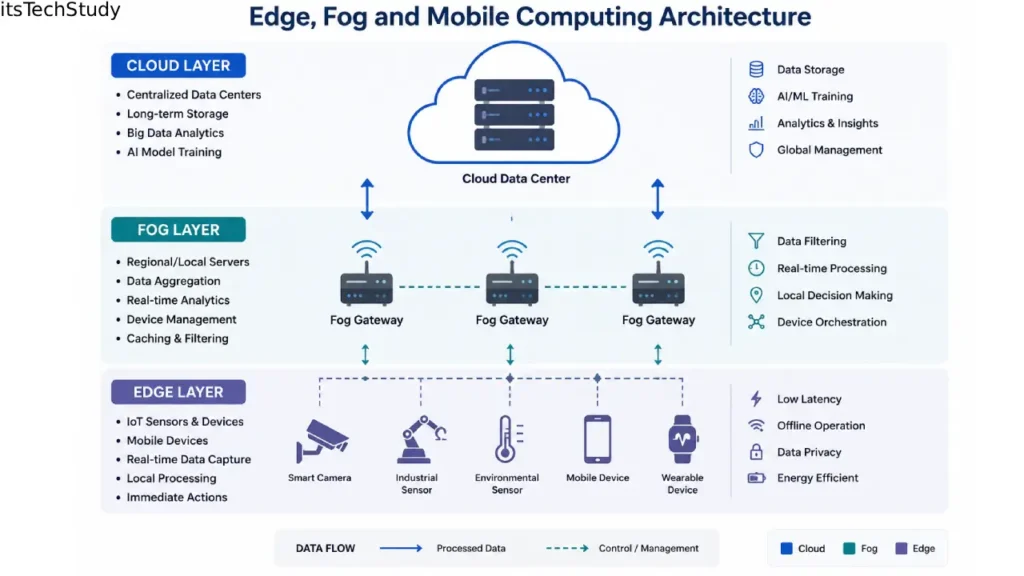
A lot of beginner articles oversimplify this distinction. In practice, these technologies often work together.
For example:
- A smartwatch collects health data (mobile computing)
- The phone processes some data locally (edge computing)
- A nearby gateway aggregates regional data (fog computing)
- Long-term analytics happen in the cloud
That’s how many modern architectures actually operate.
Why This Matters More Than Ever
The biggest shift isn’t just speed.
It’s dependency reduction.
Cloud-first systems assume:
- stable internet,
- affordable bandwidth,
- centralized control,
- and acceptable latency.
But modern systems increasingly operate in places where those assumptions fail.
Think about:
- factories,
- remote farms,
- smart traffic systems,
- delivery robots,
- retail analytics,
- autonomous drones,
- wearable devices.
These environments can’t always wait for cloud responses.
A delay of:
- 300 milliseconds in video streaming is fine,
- but 300 milliseconds in industrial safety systems can become dangerous.
That’s why companies are pushing computing closer to users and devices.
Understanding Edge Computing (Without the Buzzword Nonsense)
What Edge Computing Actually Means
Edge computing means processing data close to where it’s generated.
Instead of sending everything to a distant cloud server, the device – or a nearby edge server – handles part of the workload locally.
Example
A smart security camera:
- captures video,
- detects motion locally,
- sends only important clips to the cloud.
Instead of streaming 24/7 footage continuously.
That single architectural change can reduce bandwidth usage massively.
In one prototype I worked on, local image filtering reduced outgoing traffic by nearly 85%. That’s the kind of practical improvement people rarely mention in high-level articles.
Real-World Edge Computing Use Cases
Smart Retail Stores
Stores use edge AI cameras to:
- count customers,
- detect empty shelves,
- monitor queues.
Processing locally avoids sending raw video continuously.
Industrial IoT
Factories use edge systems for:
- vibration monitoring,
- predictive maintenance,
- machine anomaly detection.
Latency matters here because delayed alerts can cause production downtime.
Autonomous Vehicles
Cars cannot depend on cloud internet to brake safely.
Core decisions happen directly on the vehicle.
Pros and Cons of Edge Computing
| Pros | Cons |
|---|---|
| Low latency | Harder device management |
| Reduced bandwidth usage | Limited device hardware |
| Better offline capability | Security complexity |
| Faster real-time decisions | Updating edge devices can be difficult |
One mistake beginners make is assuming edge computing replaces the cloud entirely.
It usually doesn’t.
Most successful systems are hybrid architectures.
Fog Computing: The Layer Most Beginners Ignore
Fog computing sits between edge devices and centralized cloud infrastructure.
Honestly, this is the part many tutorials barely explain well.
Fog nodes often act as:
- local aggregators,
- coordinators,
- filtering systems,
- temporary analytics layers.
A Practical Fog Computing Scenario
Imagine a smart traffic system across a city.
Without fog computing:
- every traffic camera uploads data directly to the cloud.
With fog computing:
- regional fog nodes process local intersections,
- coordinate traffic signals,
- detect congestion faster,
- send summarized insights upstream.
This reduces:
- latency,
- cloud load,
- and unnecessary data transfer.
Why Fog Computing Exists
Here’s the non-obvious insight many people miss:
Fog computing is often more about scalability than raw speed.
When thousands of edge devices communicate directly with the cloud, systems become messy fast.
Fog layers help organize distributed infrastructure.
They:
- normalize device communication,
- manage local policies,
- cache temporary data,
- handle regional orchestration.
In practice, fog computing becomes extremely useful once deployments grow beyond a few hundred devices.
When Fog Computing Is Overkill
I’ve seen teams add fog layers too early.
That’s a mistake.
If you only have:
- a handful of devices,
- simple workflows,
- no real-time coordination needs,
then edge + cloud may be enough.
Fog computing adds operational complexity.
And complexity always has a maintenance cost.
Mobile Computing: More Powerful Than Most People Realize
Mobile computing used to mean “using laptops and smartphones wirelessly.”
That definition feels outdated now.
Modern smartphones are surprisingly capable computing platforms.
Today’s phones can:
- run AI models locally,
- perform augmented reality rendering,
- process biometric authentication,
- handle offline analytics,
- support edge AI inference.
Why Mobile Computing Is Becoming an Edge Platform
Phones are now miniature edge computers.
For example:
- voice assistants process wake-word detection locally,
- camera apps enhance images in real time,
- translation apps work offline,
- fitness apps analyze sensor data instantly.
This matters because:
- privacy improves,
- response times improve,
- cloud costs decrease.
One Mistake I Made in Mobile Architecture
When I first built a location-heavy mobile app, I assumed cloud APIs should handle everything.
Bad decision.
The app became frustrating on unstable networks.
Eventually I moved:
- caching,
- partial analytics,
- and session logic
onto the device itself.
The user experience improved immediately.
Sometimes beginner developers underestimate how much users hate waiting for network requests.
Mini Case Study: Smart Agriculture System
Let’s combine all three concepts.
A smart farming setup might work like this:
Mobile Computing
Farmers use a mobile app to:
- monitor irrigation,
- receive alerts,
- control pumps remotely.
Edge Computing
Sensors near crops:
- measure moisture,
- detect temperature changes,
- trigger irrigation automatically.
Fog Computing
A regional gateway:
- aggregates sensor data,
- coordinates multiple fields,
- manages local AI predictions.
Cloud Layer
The cloud handles:
- long-term analytics,
- dashboards,
- machine learning retraining.
This layered design is becoming increasingly common.
Step-by-Step: How Beginners Should Approach These Technologies
Step 1: Start With the Latency Question
Ask:
“How fast must this system respond?”
If milliseconds matter, edge computing becomes important.
Step 2: Measure Data Volume
Large continuous data streams often benefit from edge filtering.
Examples:
- video,
- sensor telemetry,
- industrial monitoring.
Step 3: Decide What Can Work Offline
This is huge.
Many systems fail because developers assume internet availability.
A good rule:
- critical functions should survive temporary disconnections.
Step 4: Add Fog Only When Coordination Becomes Difficult
Fog layers help:
- large IoT deployments,
- distributed analytics,
- regional orchestration.
Don’t introduce it prematurely.
Step 5: Keep the Cloud for What It Does Best
Cloud infrastructure still excels at:
- large-scale storage,
- AI training,
- backups,
- centralized dashboards,
- heavy analytics.
The smartest architectures combine all layers intelligently.
Common Mistakes Beginners Make
1. Treating Edge Computing Like a Marketing Trend
Not every app needs edge processing.
If latency isn’t critical, cloud systems may be simpler and cheaper.
2. Ignoring Device Maintenance
Managing 10,000 edge devices is not fun.
Updates, monitoring, and security become operational headaches quickly.
This is rarely emphasized in beginner tutorials.
3. Sending Too Much Raw Data
One practical lesson:
preprocess aggressively near the source.
Especially for:
- video,
- audio,
- telemetry streams.
Bandwidth savings can be enormous.
4. Underestimating Security Risks
Edge devices are physically accessible.
That changes security assumptions completely.
In my experience, teams often focus heavily on cloud security while forgetting device-level vulnerabilities.
5. Building Overcomplicated Architectures Too Early
This happens constantly.
People add:
- Kubernetes,
- fog orchestration,
- AI inference layers,
- distributed messaging systems
before validating basic requirements.
Simple systems are easier to debug.
Pro Tips That Most Beginner Guides Don’t Mention
1. Edge AI Is Usually Memory-Limited, Not CPU-Limited
Many developers focus only on processor power.
But memory constraints often become the real bottleneck.
Especially on embedded hardware.
2. Local Filtering Often Matters More Than Local Intelligence
Sometimes you don’t need advanced AI at the edge.
Simple filtering rules can eliminate huge amounts of unnecessary traffic.
3. Connectivity Costs Become a Hidden Scaling Problem
Cloud bandwidth bills can become surprisingly expensive in large IoT deployments.
Processing locally reduces operational costs significantly.
4. Fog Nodes Can Become Single Points of Failure
Ironically, poorly designed fog layers sometimes reduce resilience.
Always plan fallback behavior.
5. Offline UX Is a Competitive Advantage
Users notice reliability more than architecture diagrams.
Apps that continue functioning during weak connectivity feel dramatically better.
Quick Summary Box
Key Takeaways
- Edge computing handles processing near devices
- Fog computing coordinates distributed local systems
- Mobile devices are now powerful edge platforms
- Hybrid architectures usually outperform cloud-only designs
- Latency, bandwidth, and reliability drive architectural decisions
Is edge computing expensive?
It can be initially, especially with hardware deployment and device management. But bandwidth and latency savings may offset costs over time.
Final Thoughts
Edge, fog, and mobile computing are not competing technologies.
They’re layers of the same modern computing shift.
The real change happening right now is this:
Computing is moving closer to where data is created.
And honestly, that’s necessary.
Cloud-only architectures struggle when:
- latency matters,
- bandwidth becomes expensive,
- reliability is inconsistent,
- or systems need real-time intelligence.
But here’s the important nuance beginners often miss:
Not every system needs edge computing.
Sometimes the simplest cloud architecture is still the best option.
The smartest engineers I’ve worked with don’t chase trends blindly. They ask practical questions:
- What problem are we solving?
- Where does latency actually matter?
- What happens when connectivity fails?
- What’s the operational cost of complexity?
Those questions matter far more than buzzwords.
And as AI, IoT, robotics, and smart devices continue growing, understanding these computing models will become less “optional knowledge” and more foundational engineering literacy.

About the Author
Amelia Morgan is a Editor at itsTechStudy.com with 15+ years of experience in the technology industry. I write about emerging innovations, AI, and digital trends-making complex topics simple and engaging for readers.
FAQ Section
Q1: What is the difference between edge and fog computing?
Ans: Edge computing processes data directly on or near devices. Fog computing adds an intermediate layer that coordinates multiple edge systems locally before communicating with the cloud.
Q2: Is fog computing still relevant today?
Ans: Yes, especially in large IoT environments. While edge computing gets more attention, fog layers remain useful for regional orchestration and distributed management.
Q3: Can mobile phones be considered edge devices?
Ans: Absolutely. Modern smartphones perform local AI inference, caching, biometric processing, and offline analytics.
Q4: Does edge computing eliminate the cloud?
Ans: No. Most production systems use hybrid architectures combining edge, fog, and cloud components.
Q5: When should beginners avoid edge computing?
Ans: Avoid it if: latency is not important, internet connectivity is stable, workloads are lightweight, operational simplicity matters more.
Q6: What industries benefit most from edge computing?
Ans: Industries with real-time requirements: manufacturing, healthcare, autonomous systems, smart cities, logistics, retail analytics.





No Comments Yet
Be the first to share your thoughts.
Leave a Comment