

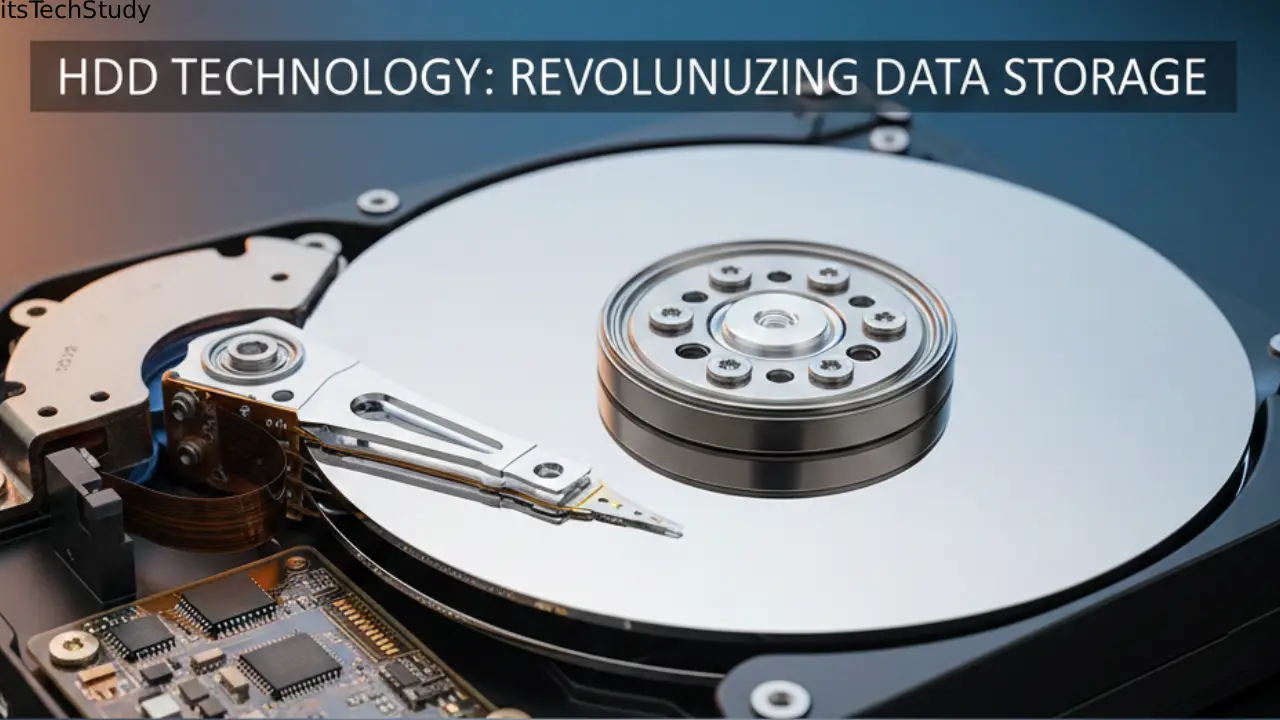
Introduction: Why HDD Technology Still Matters in a World of Rapid Digital Transformation
For decades, Hard Disk Drives (HDDs) have served as the backbone of digital storage. Before cloud servers, NVMe SSDs, or high-end storage arrays existed, there were spinning magnetic disks powering everything from personal computers to enterprise data centers. Although today’s digital world is rapidly shifting toward solid-state technologies, HDDs continue to play a vital role because of their unmatched balance of affordability, high capacity, and long-term archival reliability.
Yet, the technology behind HDDs isn’t static – it has evolved dramatically. Modern HDDs are far more efficient, denser, and technologically advanced than those from even a decade ago. They incorporate innovations like helium-filled chambers, shingled magnetic recording (SMR), multi-actuator arms, and intelligent firmware-driven caching systems..
Despite the rise of faster storage solutions, professionals across industries still rely on HDDs for massive data storage, backup systems, and cost-effective archiving. So, understanding how HDD technology works, where it excels, and how it compares to SSD alternatives is essential for anyone building PCs, managing data, or working in the tech ecosystem.
In this detailed guide, we’ll dive deep into the evolution, internal design, performance characteristics, strengths, limitations, and modern use cases of Hard Disk Drive technology – written in natural, conversational English that feels like an experienced tech blogger’s insights.
Understanding the Core Technology Behind HDDs
What Exactly Is an HDD?
A Hard Disk Drive is an electro-mechanical storage device that uses spinning magnetic platters and a moving actuator arm to read and write data. Data is stored magnetically, which allows the device to retain information even when powered off — making it non-volatile storage.
How HDDs Store Data
- Data is written using magnetic polarity changes.
- Platters spin at speeds ranging from 5400 RPM to 15,000 RPM.
- A read/write head floats above the disk surface without ever touching it.
- Sophisticated motors maintain precise positioning while minimizing vibration.
This combination of mechanical precision and magnetic engineering is what makes HDDs both fascinating and technically complex.
Evolution of HDD Technology
From Room-Sized Machines to Pocket-Sized Drives
The first hard drives from the 1950s were refrigerator-sized and stored just a few megabytes. Fast-forward to today, and you can easily buy a portable 5TB drive small enough to fit in your hand.
Major Milestones in HDD Development
- 1956 – IBM introduces the first HDD (RAMAC 350).
- 1980s – HDDs become consumer-friendly with capacities under 100MB.
- 1990s–2000s – Gigabyte and terabyte barriers are broken.
- 2010s – Helium-filled drives and SMR technology expand storage density.
- 2020s – Drives exceed 20TB and incorporate dual actuators for faster throughput.
Today, HDD innovation continues with HAMR (Heat-Assisted Magnetic Recording) and MAMR (Microwave-Assisted Magnetic Recording) – technologies designed to push capacity even further.
Internal Architecture: How an HDD Is Built
To understand HDD technology, it helps to visualize what’s inside.
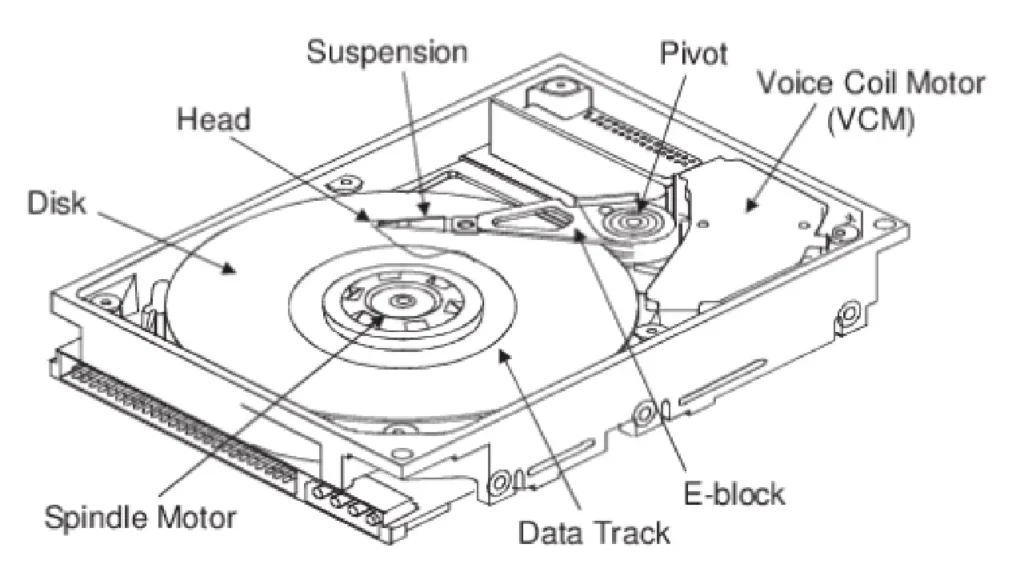
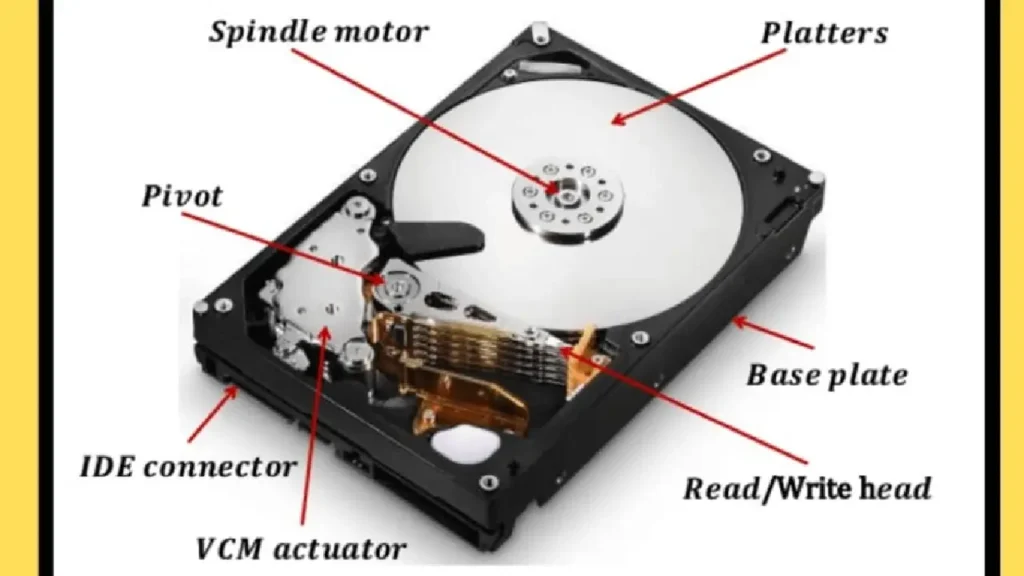
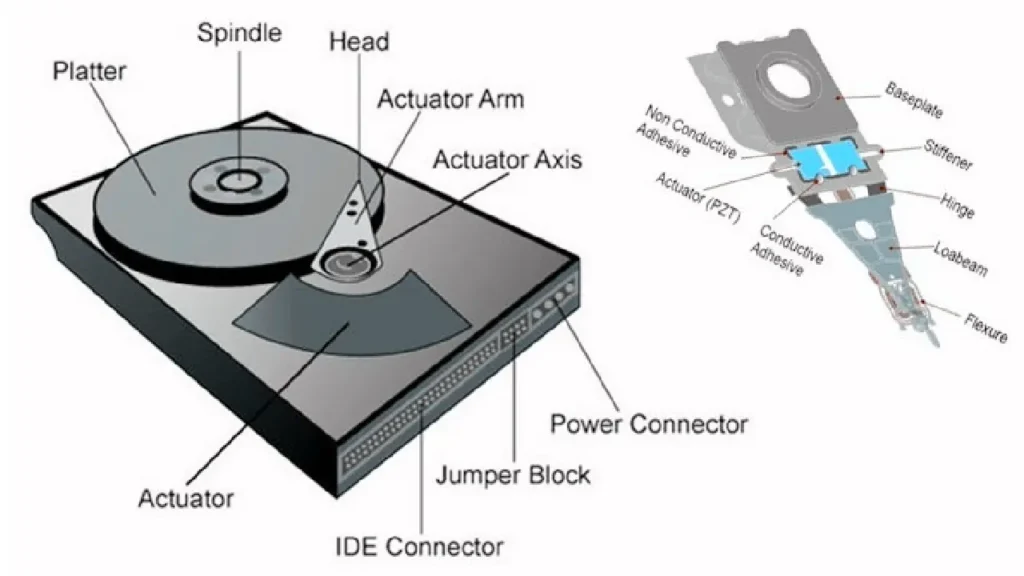
Key Components of an HDD
1. Platters
Circular disks coated with magnetic material. Each platter has two usable sides.
2. Spindle
The rotating axis that spins the platters at a constant rate.
3. Read/Write Heads
Tiny electromagnetic sensors positioned nanometers above each platter surface.
4. Actuator Arm
Moves the heads across the platters with high precision.
5. Actuator (Voice Coil Motor)
Controls the arm movement similar to how speakers use electromagnets.
6. PCB (Controller Board)
The “brain” that manages data flow, caching, error correction, and communication with the computer.
7. Enclosure
A sealed, dust-free environment to protect internal components from contamination.
How HDD Performance Works
Key HDD Performance Metrics
1. RPM (Rotations Per Minute)
- Affects latency and throughput.
- Common speeds: 5400, 7200, 10,000, and 15,000 RPM.
2. Cache Buffer
Temporarily stores frequently accessed data to minimize mechanical movement.
3. Average Seek Time
Time required for the actuator arm to position over the right track.
4. Data Transfer Rate
Measured in MB/s or Gbps (SATA/NVMe interface).
Performance Expectations by Type
| HDD Type | RPM | Typical Use | Average Speed |
|---|---|---|---|
| Laptop HDD | 5400 RPM | Budget laptops/portable storage | 80–120 MB/s |
| Desktop HDD | 7200 RPM | PCs, gaming, general use | 120–160 MB/s |
| Enterprise HDD | 10,000–15,000 RPM | Servers, data centers | 200+ MB/s |
| Helium High-Capacity HDD | 7200 RPM | Cloud storage, NAS | Up to 260 MB/s |
Modern HDD Technologies and Innovations
1. Helium-Filled HDDs
Helium has lower density than air, reducing friction, heat, and turbulence. This allows:
- More platters in the same space
- Lower power consumption
- Better thermal efficiency
2. SMR (Shingled Magnetic Recording)
Overlaps data tracks to increase density.
Best For:
- Archiving
- Cloud backups
- Write-once workloads
Not Ideal For:
- High-speed random writes
- Heavy NAS usage
3. CMR (Conventional Magnetic Recording)
Classic HDD technology with stable performance.
Best For:
- Everyday computing
- Gaming
- NAS devices
4. Dual-Actuator Drives
Two actuators move independently, enabling faster data access – almost doubling throughput.
5. HAMR / MAMR
Emerging technologies that use heat or microwaves to write data at extremely high densities – enabling 30TB+ HDDs in the future.
HDD vs SSD: A Practical Comparison
Even though SSDs dominate modern performance-focused devices, HDDs offer their own strengths.
Comparison Table: HDD vs SSD
| Feature | HDD | SSD |
|---|---|---|
| Speed | Slower (mechanical limits) | Extremely fast |
| Durability | Prone to mechanical wear | Shock-resistant, no moving parts |
| Price/GB | Much cheaper | More expensive |
| Capacity | Larger capacities available | Lower max capacity (for now) |
| Best Use Cases | Backups, large storage | OS, gaming, applications |
Pros and Cons of HDD Technology
Advantages of HDDs
- Cost-effective for large storage needs
- High capacity options (up to 22TB and increasing)
- Long-term archival stability
- Widely compatible with most devices
- Ideal for sequential workloads
Disadvantages of HDDs
- Slower read/write speeds
- Vulnerable to mechanical failure
- Weigh more than SSDs
- Can be noisy
- Higher latency in random I/O operations
Where HDDs Excel in Modern Computing
1. Data Centers and Cloud Providers
Massive storage at low cost makes HDDs the backbone of cloud infrastructure.
2. Backup and Archival Systems
Magnetic storage remains extremely reliable for long-term retention.
3. NAS and Home Servers
Ideal for users who store:
- Media libraries
- Backup snapshots
- Surveillance footage
4. Budget Desktops and Laptops
Offers affordable expansion for general users.
Buying Guide: Choosing the Right HDD
Key Factors to Consider
1. RPM
- 5400 RPM for basic storage
- 7200 RPM for better performance
- 10,000+ RPM for enterprise
2. Capacity Requirements
- 1TB – Basic use
- 2–4TB – Media and documents
- 6–10TB – Heavy work/media servers
- 12TB+ – Data archives or NAS
3. Interface
- SATA – Most common
- SAS – Enterprise servers
- USB 3.x – External drives
4. Use Case
Match drive type with workload (CMR vs SMR).
5. Brand Reliability
Top brands:
- Western Digital (WD)
- Seagate
- Toshiba
- HGST
Maintenance Tips to Increase HDD Lifespan
- Avoid physical shocks or vibrations
- Keep the drive cool with proper airflow
- Defragment regularly (HDDs only)
- Use SMART monitoring tools
- Avoid filling the drive above 85%
- Always eject safely
Conclusion: The Continuing Relevance of HDD Technology
Even in a world where SSDs dominate headlines, HDD technology continues to hold its ground. Its unbeatable price-to-capacity ratio, massive storage potential, and proven reliability make it essential for backup systems, data centers, and everyday consumers who need affordable storage. Modern enhancements like helium-sealed enclosures, HAMR, dual actuators, and intelligent caching ensure HDDs remain relevant for years to come.
While SSDs are the future for performance-critical applications, HDDs remain the champion of bulk storage. Understanding what HDDs offer helps users, businesses, and tech professionals make smarter decisions in an increasingly data-driven world.

About the Author
Tobias Hale is a technology writer and software analyst with a sharp eye on the ever-evolving world of digital innovation. With a deep passion for clean code, secure systems, and emerging technologies, Tobias brings clarity to complex topics - from the latest in operating system updates to cutting-edge software security practices.
Frequently Asked Questions (FAQ)
Q1: How long does an HDD typically last?
Ans: Most HDDs last 3–7 years, depending on workload, quality, and environmental conditions. Enterprise models often last longer.
Q2: Can an HDD be used with SSD in the same system?
Ans: Yes. Many users install the OS on an SSD for speed and use an HDD for large file storage
Q3: s HDD still good for gaming?
Ans: HDDs can store games, but load times will be longer than SSDs. For best performance, SSD is preferred, but HDDs remain excellent for storing large game libraries.
Q4: What causes HDD failures?
Ans: Common causes include: Mechanical wear Heat Shock damage Power surges Firmware issues
Q5: Should I choose SMR or CMR?
Ans: Choose CMR for everyday computing, gaming, and NAS. Choose SMR only for archive/backup workloads where you don’t frequently rewrite data.
Q6: Are external HDDs safe for long-term storage?
Ans: Yes, especially if stored properly. Keep them in cool, dry places and power them on occasionally to maintain health.








No Comments Yet
Be the first to share your thoughts.
Leave a Comment