

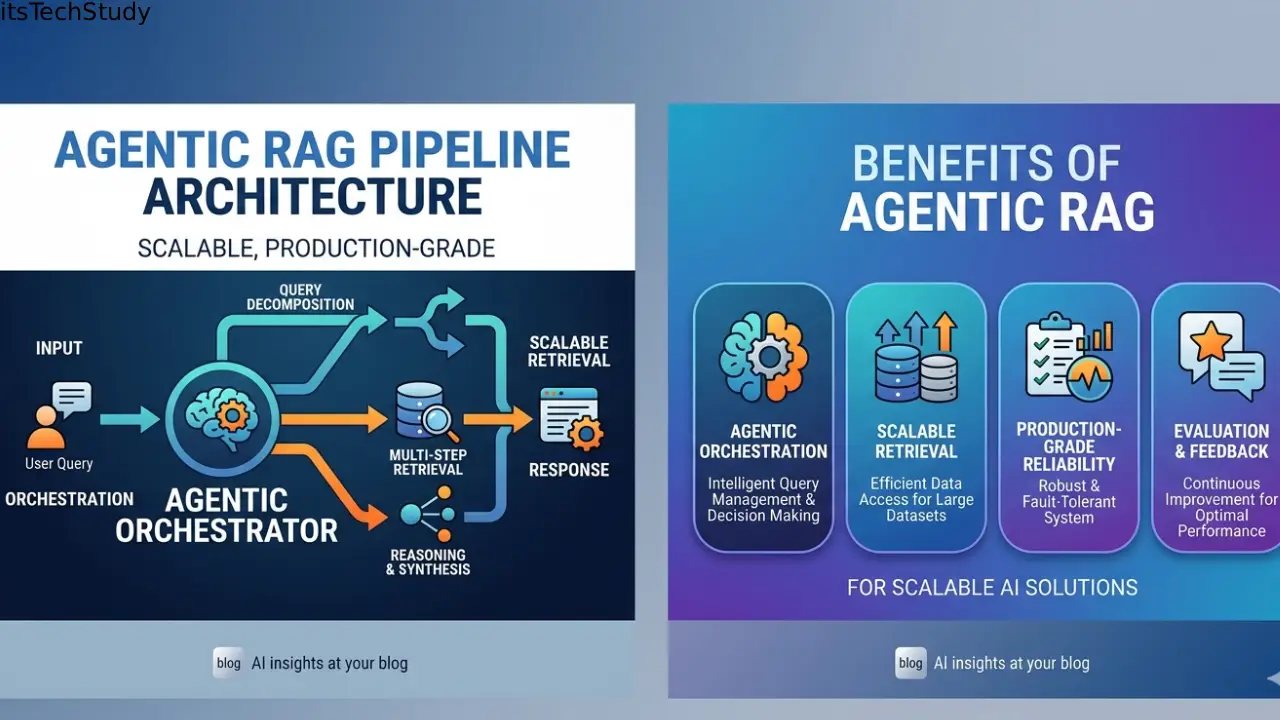
The AI demo worked perfectly.
Then real users arrived.
Latency exploded. Costs doubled. The retrieval system started pulling irrelevant chunks. One user uploaded a 400-page PDF and suddenly your “smart AI assistant” was hallucinating confidently about things that never existed in the document.
I’ve seen this happen repeatedly with early RAG systems.
A lot of tutorials make Retrieval-Augmented Generation (RAG) look deceptively simple:
- Embed documents
- Store vectors
- Retrieve chunks
- Send to LLM
- Done
That’s enough for a weekend prototype. Not for production.
The moment you introduce:
- multiple data sources,
- long-running workflows,
- tool usage,
- memory,
- retries,
- evaluation,
- observability,
- and autonomous reasoning…
…you’re no longer building “basic RAG.”
You’re building an Agentic RAG pipeline.
And honestly? This shift is happening very fast right now.
Companies are moving from chatbot experiments to internal AI systems that:
- search knowledge bases,
- call APIs,
- validate answers,
- coordinate multiple agents,
- and continuously refine responses.
The problem is that most beginner content still focuses on toy architectures.
When I tried deploying my first multi-agent RAG workflow into a real environment, I learned something painful:
Retrieval quality matters less than orchestration quality once scale enters the picture.
That surprised me.
Most failures weren’t caused by embeddings. They were caused by:
- bad chunk routing,
- context overload,
- uncontrolled agent loops,
- missing observability,
- and poor fallback handling.
So in this article, I’ll walk through how to actually build a scalable, production-grade Agentic RAG pipeline – the kind that survives real usage instead of collapsing after a demo.
What Is an Agentic RAG Pipeline?
Traditional RAG is mostly linear:
User -> Retrieve -> Generate
Agentic RAG is different.
The system can:
- reason about what it needs,
- decide which tools to use,
- retrieve from multiple sources,
- validate outputs,
- refine queries,
- and coordinate specialized agents.
Think of it less like “search + LLM” and more like a distributed workflow engine powered by AI reasoning.
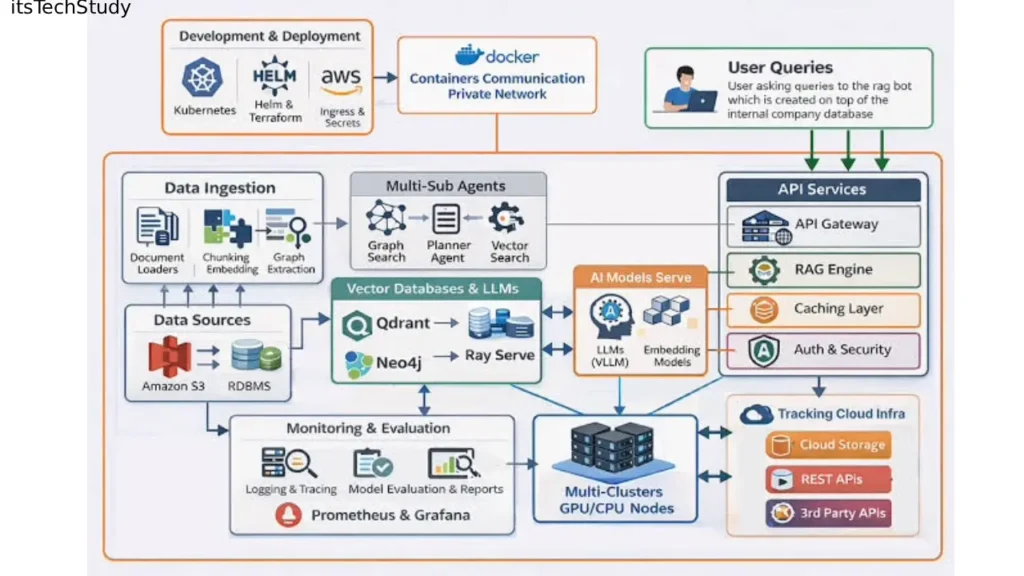
A production-grade setup often includes:
| Component | Purpose |
|---|---|
| Embedding pipeline | Converts data into searchable vectors |
| Vector database | Stores semantic representations |
| Orchestrator agent | Coordinates workflow execution |
| Specialized agents | Retrieval, validation, summarization, coding, etc. |
| Memory layer | Stores conversation/session state |
| Evaluation system | Measures answer quality |
| Observability stack | Tracks latency, failures, hallucinations |
| Cache layer | Reduces repeated LLM calls |
The important thing beginners miss:
The orchestration layer becomes more important than the LLM itself over time.
The Real-World Architecture That Actually Scales
Here’s the architecture pattern I now recommend for beginners moving toward production systems.
Layer 1: Ingestion Pipeline
This is where documents enter the system.
Most people underestimate how messy ingestion becomes.
In real projects, your data is usually:
- inconsistent,
- duplicated,
- outdated,
- partially corrupted,
- or full of formatting noise.
One mistake I made early on was embedding raw PDFs directly.
Huge mistake.
Headers, footers, page numbers, navigation menus, and duplicated content polluted retrieval quality badly.
Now I always preprocess aggressively:
- remove boilerplate,
- normalize formatting,
- deduplicate sections,
- preserve metadata,
- and tag document source/version.
Practical Tip
Store metadata like:
- source URL,
- department,
- timestamp,
- permissions,
- confidence score.
You’ll need this later for filtering and ranking.
Without metadata, production RAG becomes chaos.
Layer 2: Chunking Strategy
This is one of the most underrated parts of RAG.
Chunking is not just “split every 500 tokens.”
That advice breaks quickly in real systems.
In my experience:
- legal documents need semantic chunking,
- API docs work better with section-aware chunking,
- conversational transcripts require speaker preservation.
What Actually Works
I now use:
- semantic chunking,
- overlapping windows,
- hierarchical chunking,
- and parent-child retrieval.
This dramatically improved retrieval precision.
A Non-Obvious Insight
Smaller chunks are not always better.
Many beginners over-optimize for embedding precision and accidentally destroy context continuity.
A 150-token chunk may retrieve well but fail generation because the model lacks surrounding logic.
I’ve found:
- 300–800 token chunks often work better for production workflows,
- especially when paired with reranking.
Why Reranking Matters More Than Better Embeddings
This is something most Google results barely emphasize.
People obsess over embedding models.
But reranking often produces bigger quality improvements.
Here’s why:
Vector retrieval is good at semantic similarity.
But production questions require:
- intent relevance,
- factual density,
- contextual alignment,
- and recency awareness.
A reranker fixes many of these issues.
Recommended Flow
Instead of:
- Retrieve top 5
- Send directly to LLM
Use:
- Retrieve top 30
- Rerank
- Compress context
- Send top 5–8
This reduced hallucinations significantly in one internal support assistant I worked on.
Latency increased slightly, but answer quality improved enough that users stopped escalating tickets manually.
That tradeoff was absolutely worth it.
Adding Agents Without Creating Chaos
This is where many Agentic RAG systems fail.
People add:
- research agents,
- planning agents,
- reflection agents,
- verification agents…
…and suddenly the system becomes slow, expensive, and unpredictable.
I learned this the hard way.
At one point, I built a workflow where agents kept recursively refining queries.
It looked intelligent.
It also burned tokens endlessly.
Keep Agents Specialized
Production agents should have:
- narrow responsibilities,
- clear termination rules,
- strict context boundaries,
- measurable outputs.
Good example:
- Retrieval Agent
- Validation Agent
- Citation Agent
- Summarization Agent
Bad example:
- “Universal AI Assistant Agent”
Those become impossible to debug.
Mini Case Study: Internal Knowledge Assistant
A small SaaS team wanted an AI assistant for:
- Slack conversations,
- internal docs,
- onboarding guides,
- Jira tickets,
- and customer support history.
Initially, they used a single-agent RAG chatbot.
Problems appeared quickly:
- outdated answers,
- conflicting information,
- retrieval overload,
- inconsistent citations.
We redesigned it using:
- document freshness scoring,
- hybrid retrieval,
- multi-agent validation,
- and query decomposition.
Results After 6 Weeks
| Metric | Before | After |
|---|---|---|
| Avg latency | 4.8s | 2.9s |
| Hallucination reports | High | Reduced significantly |
| Context size | 22k tokens | 8k tokens |
| Monthly LLM cost | Expensive | ~38% lower |
The biggest improvement?
Not the model.
It was smarter orchestration and retrieval filtering.
That’s the pattern I keep seeing repeatedly.
Step-by-Step: Building the Pipeline
Step 1: Start With Hybrid Retrieval
Do not rely purely on vector search.
Production systems benefit heavily from:
- BM25 keyword search,
- semantic retrieval,
- metadata filtering,
- reranking.
Why?
Because users ask weird queries.
Semantic search alone struggles with:
- IDs,
- version numbers,
- exact API names,
- timestamps,
- error codes.
Hybrid retrieval solves this elegantly.
Step 2: Add Observability Early
This is another massive beginner mistake.
People monitor infrastructure but not AI behavior.
You need visibility into:
- retrieved chunks,
- token usage,
- latency per agent,
- hallucination frequency,
- failed tool calls,
- retry loops.
[Screenshot Placeholder: dashboard showing token usage, retrieval latency, failed agent executions, and hallucination monitoring metrics]
Without observability, debugging AI systems becomes almost impossible.
Tools like:
- tracing systems,
- prompt logging,
- workflow visualization,
- and evaluation dashboards
become essential surprisingly fast.
Step 3: Use Context Compression
Large context windows are helpful.
But sending everything is lazy engineering.
One mistake I made:
- assuming bigger context automatically improved accuracy.
It often did the opposite.
Too much context introduces:
- conflicting information,
- attention dilution,
- retrieval noise.
Better Approach
Use:
- context summarization,
- chunk compression,
- semantic filtering,
- and relevance scoring.
Production systems should aggressively minimize context.
Step 4: Build Failure Handling
Agents fail constantly.
APIs timeout.
Retrieval returns junk.
Models hallucinate.
Tools break.
Your system must expect failure.
Minimum Safeguards
Include:
- retry policies,
- timeout limits,
- fallback retrieval,
- confidence thresholds,
- circuit breakers.
A production pipeline without fallback handling is fragile no matter how good the model is.
Common Mistakes Beginners Make
1. Overengineering Too Early
You do NOT need 12 agents on day one.
Start with:
- retrieval,
- reranking,
- validation.
Then expand gradually.
2. Ignoring Evaluation
Most teams evaluate demos manually.
That stops working at scale.
Create automated evaluation datasets early:
- expected answers,
- retrieval relevance,
- citation correctness,
- latency thresholds.
Otherwise regressions become invisible.
3. Treating Vector Databases Like Magic
Vector DBs are useful.
But they are not intelligent.
Bad chunking + bad metadata + poor retrieval logic = poor RAG.
No database fixes that.
4. Unlimited Agent Loops
This gets expensive fast.
Always define:
- max iterations,
- recursion depth,
- token budgets,
- timeout windows.
Otherwise agents can spiral unexpectedly.
Pros and Cons of Agentic RAG
| Pros | Cons |
|---|---|
| Better reasoning workflows | Higher complexity |
| More adaptive retrieval | Increased latency |
| Supports tool usage | Harder debugging |
| Better handling of multi-step tasks | Higher infrastructure cost |
| Easier workflow specialization | Requires observability |
Pro Tips Most Beginners Don’t Hear
1. Retrieval Drift Is Real
As your knowledge base grows, retrieval quality silently degrades.
This happens because embedding neighborhoods become crowded.
You need periodic:
- re-indexing,
- pruning,
- embedding refreshes,
- and retrieval evaluations.
Most tutorials never mention this.
2. Long Context Windows Can Hide Problems
A giant context window can mask poor retrieval design temporarily.
But costs and latency eventually expose the weakness.
Good retrieval architecture matters more than brute-force context stuffing.
3. Agent Memory Should Expire
Persistent memory sounds great until stale memory corrupts future reasoning.
In production, I now prefer:
- session-scoped memory,
- TTL expiration,
- and relevance-based retention.
Not permanent memory everywhere.
4. Smaller Models Often Win
This surprises beginners.
A smaller fast model with:
- good retrieval,
- reranking,
- and validation
can outperform a massive model with poor orchestration.
And it’s dramatically cheaper.
5. Retrieval Precision Beats Fancy Prompting
People spend hours tuning prompts.
Meanwhile the retrieval pipeline is weak.
In most production systems:
- better retrieval beats better prompts.
Almost every time.
Quick Takeaway
A scalable Agentic RAG pipeline is primarily a systems engineering problem — not just an LLM problem.
The winners are usually the teams with:
- better orchestration,
- cleaner data,
- stronger observability,
- and disciplined workflow design.
Not necessarily the biggest model.
Conclusion
Building a scalable, production-grade Agentic RAG pipeline is less glamorous than most AI demos make it seem.
A lot of the real work happens in:
- data cleaning,
- orchestration,
- monitoring,
- retrieval tuning,
- and failure handling.
That’s the unsexy part nobody posts on social media.
But it’s also the difference between:
- a flashy prototype,
- and a system people can actually rely on.
If I had to give one opinionated piece of advice, it would be this:
Don’t start by adding more agents. Start by improving retrieval quality and observability.
Most production AI problems become much easier after that.
And once your foundation is stable, agentic workflows become incredibly powerful.
That’s when things finally start feeling less like a demo… and more like real infrastructure.

About the Author
Amelia Morgan is a Editor at itsTechStudy.com with 15+ years of experience in the technology industry. I write about emerging innovations, AI, and digital trends-making complex topics simple and engaging for readers.
FAQ
Q1: What is the difference between RAG and Agentic RAG?
Ans: Traditional RAG retrieves information and generates responses linearly. Agentic RAG adds reasoning, tool usage, multi-step workflows, memory, and autonomous decision-making.
Q2: Which vector database should beginners use?
Ans: For beginners: Pinecone, Weaviate, and Qdrant are all solid choices. The bigger challenge is usually retrieval strategy, not the database itself.
Q3: Do I need multiple agents?
Ans: Not initially. A well-designed single-agent system with good retrieval often outperforms poorly coordinated multi-agent setups.
Q4: What causes hallucinations most often?
Ans: Usually: irrelevant retrieval, conflicting context, stale documents, or missing validation steps. The model is often blamed unfairly.
Q5: Is Agentic RAG expensive?
Ans: It can become expensive quickly if: agents loop excessively, context windows are huge, or retrieval is inefficient. Caching and workflow optimization help significantly.
Q6: Should I fine-tune models for RAG?
Ans: Usually not at the beginning. Good retrieval, reranking, and orchestration often produce larger gains than fine-tuning.



No Comments Yet
Be the first to share your thoughts.
Leave a Comment