

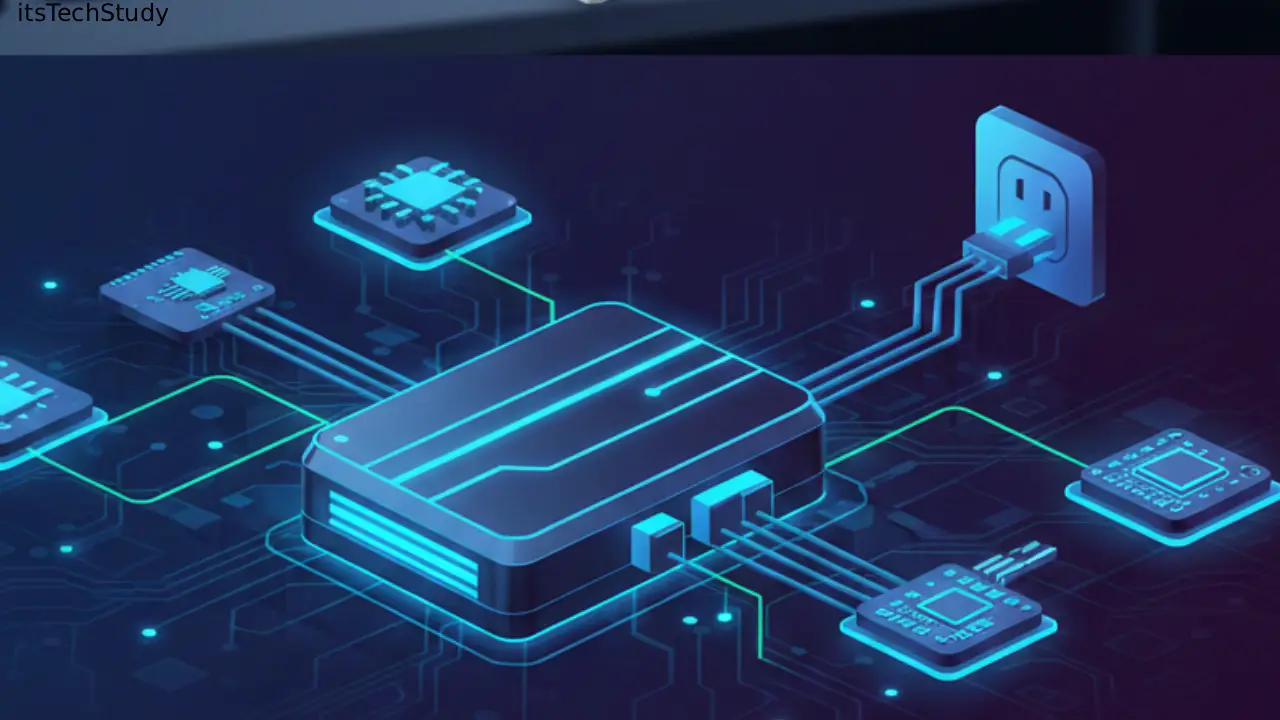
Introduction: Why the PSU Matters More Today Than Ever Before
If you look back at the evolution of personal computers-from the bulky beige boxes of the 90s to today’s ultra-efficient gaming rigs and compact workstations-almost every component has changed dramatically. Processors have become exponentially faster, GPUs now consume as much power as small appliances, and storage has shifted from spinning disks to ultra-fast NVMe drives. Yet, one part remains the silent foundation beneath all this technological advancement: the Power Supply Unit (PSU).
Despite living in the shadow of fancy graphics cards and cutting-edge processors, the PSU is the true energy source of the entire system. Without it, nothing boots, nothing runs, and nothing stays stable. Ironically, it’s also the component most users overlook until something goes terribly wrong-random shutdowns, overheating, component failure, or even system-wide burnout..
As modern hardware demands more power, better efficiency, and cleaner electrical delivery, the PSU has transitioned from a simple component to a highly engineered power management system. Today’s discussions revolve around 80 Plus efficiency ratings, modular cable designs, rail distribution, and compatibility for high-performance GPUs, showing how critical the PSU has become.
In this comprehensive 3000-word guide, we’ll break down everything you need to know about PSUs-from how they work to how you can choose the perfect one for your build-explained in accessible, conversational, and thoroughly researched detail.
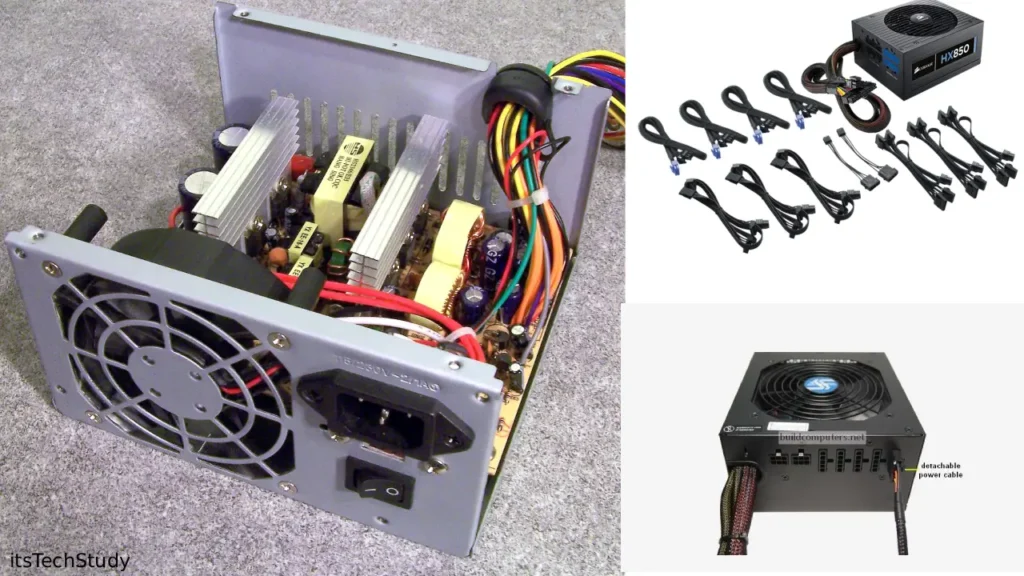
What Is a Power Supply Unit (PSU)?
A Power Supply Unit (PSU) is the component responsible for converting AC (Alternating Current) from your wall outlet into DC (Direct Current) used by your computer components. Every device inside your PC-CPU, GPU, motherboard, fans, drives-relies on the PSU for controlled and stable power.
Think of it as the heart of your computer. Just like your heart pumps blood to your organs, the PSU pushes electrical power to every part. And just like how poor heart performance affects your entire body, a cheap or weak PSU can compromise system health and longevity.
How a PSU Works: The Power Conversion Process
To appreciate why PSUs are so important, here’s a simplified breakdown of the conversion process:
- AC Input: The PSU receives alternating current from the wall.
- Rectification: Converts AC to DC.
- Power Factor Correction (PFC): Improves efficiency and minimizes energy waste.
- DC-DC Regulation: Produces stable voltages such as +12V, +5V, and +3.3V.
- Power Distribution: Sends clean, regulated power through cables to each component.
- Safety Monitoring: Protects against overvoltage, short circuits, and overloads.
This intricate engineering ensures your PC receives safe, steady power—even during voltage fluctuations.
Types of PSUs: Understanding Your Options
1. ATX Power Supplies (Most Common)
Standard for desktops, available in various wattages and modular choices.
2. SFX and SFX-L PSUs
Designed for small-form-factor builds where space is limited.
3. TFX Power Supplies
Thin and long, used in slim-profile business PCs.
4. Server Power Supplies
Designed for high reliability, redundancy, and long runtimes.
Modular vs. Semi-Modular vs. Non-Modular PSUs
1. Non-Modular
All cables are permanently attached.
Pros:
- Affordable
- Reliable due to fewer connection points
Cons:
- Poor cable management
- Difficult to maintain airflow
2. Semi-Modular
Some cables fixed (e.g., 24-pin), others detachable.
Pros:
- Flexible
- Budget-friendly
Cons:
- Not as clean as fully modular
3. Fully Modular
Every cable is removable.
Pros:
- Best cable management
- Ideal for custom builds
- Easy to replace damaged cables
Cons:
- Slightly expensive
Understanding PSU Efficiency: The 80 Plus Ratings
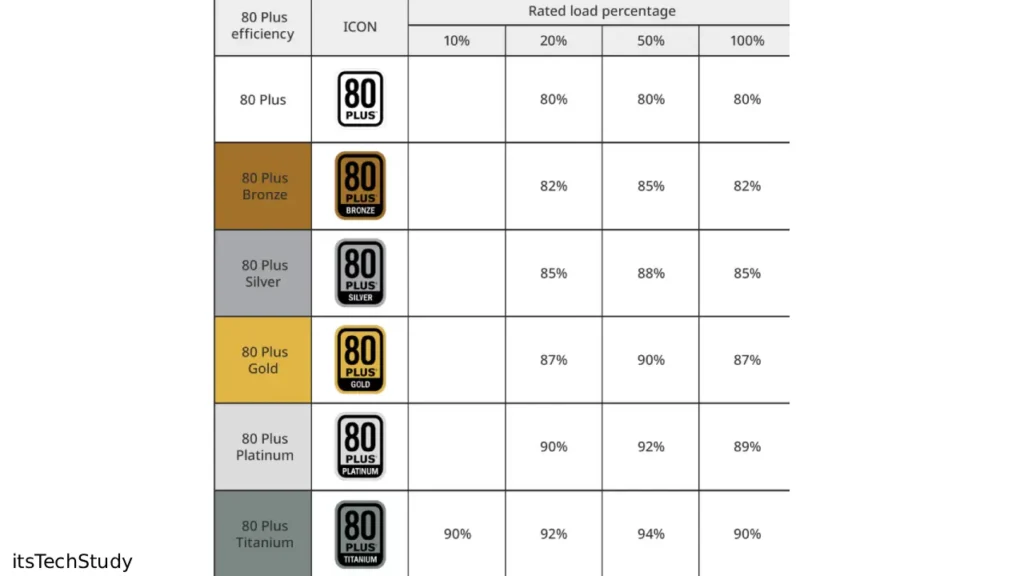
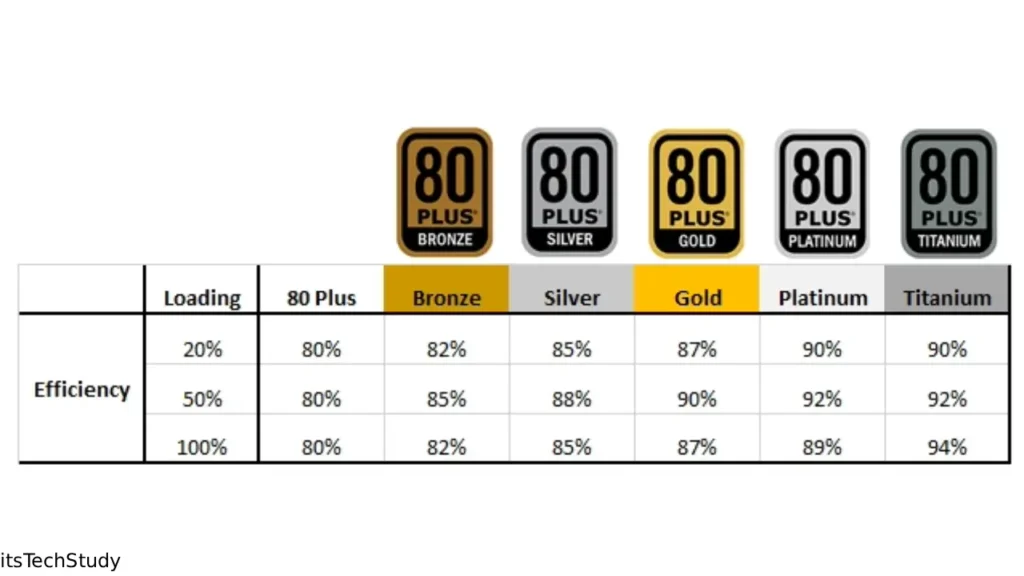
The 80 Plus Certification tells you how efficiently a PSU converts AC to DC. Higher efficiency means less heat, lower electricity bills, quieter operation, and longer lifespan.
80 Plus Efficiency Levels
| Rating | Efficiency at 50% Load | Ideal For |
|---|---|---|
| Standard 80 Plus | ~80% | Office PCs, light tasks |
| Bronze | ~85% | Budget builds |
| Silver | ~88% | Mid-ranges |
| Gold | ~90% | Gaming & productive rigs |
| Platinum | ~92% | High-performance systems |
| Titanium | ~94% | Workstations, servers |
Power Requirements: How Much Wattage Do You Actually Need?
Choosing wattage isn’t just about the total number-it’s about headroom, stability, and future-proofing.
General Wattage Recommendations
- Office PC: 400W – 500W
- Gaming PC: 650W – 850W
- High-End GPU Rig (RTX 4080/4090): 1000W – 1200W
- Workstation: 1200W+
Factors Affecting Wattage
- CPU TDP
- GPU power draw
- Number of fans
- RGB lighting
- Drives installed
- Overclocking potential
PSU Rails: Single vs. Multi-Rail Explained
A “rail” is a pathway delivering voltage-in most cases the +12V rail, which powers high-demand components.
Single-Rail
One big +12V rail delivering all current.
Pros
- Simpler design
- Ideal for high-power GPUs
- Less overload risk
Cons
- If overloaded, entire system affected
Multi-Rail
Multiple +12V rails with current limits.
Pros
- Better distribution
- Increased safety
Cons
- Can complicate setup
- Users must balance loads
Key PSU Features You Should Consider Before Buying
1. Build Quality
Look for high-quality capacitors (Japanese preferred), strong cooling, and solid internal components.
2. Protections (Critical!)
A good PSU must include:
- OVP – Over Voltage Protection
- UVP – Under Voltage Protection
- OCP – Over Current Protection
- SCP – Short Circuit Protection
- OTP – Over Temperature Protection
- OPP – Over Power Protection
3. Noise Levels
Better efficiency = lower fan speeds = quieter PSU.
4. Warranty
A strong indicator of durability.
Top brands offer up to 10–12 years.
5. GPU Connector Support (12VHPWR / PCIe 5.0)
Modern GPUs now require higher power stability.
Benefits of Using a High-Quality PSU
Pros
- Stable system performance
- Protects expensive components
- Improves energy efficiency
- Supports future upgrades
- Lower noise and heat
Cons
- Higher upfront cost
- Overkill wattage leads to wasted money
- Difficult to choose with so many specifications
Common PSU Problems and How to Identify Them
1. Random Shutdowns
Sometimes caused by insufficient wattage or PSU failure.
2. Burning Smell or High Heat
A sign of internal component failure.
3. System Fails to Boot
Often involves damaged capacitors or dead PSU.
4. GPU Crashing During Gaming
Indicates unstable +12V rail output.
Tips for Choosing the Right PSU for Your Build
- Calculate total wattage with a 20–30% headroom.
- Choose at least 80 Plus Bronze; Gold is ideal for gaming.
- Prefer modular PSUs for better cable management.
- Check GPU compatibility (especially PCIe 5.0 power).
- Choose trusted brands (Seasonic, Corsair, EVGA, Cooler Master).
- Check reviews and ripple/noise testing reports.
- Always prioritize protective features.
Table: PSU Comparison by Category
| Category | Budget Build | Mid-Range Build | High-End Build |
|---|---|---|---|
| Wattage | 450W – 550W | 650W – 850W | 1000W – 1300W |
| Efficiency | 80+ Bronze | 80+ Gold | 80+ Platinum/Titanium |
| GPU Support | Entry-level | Mid-tier GPUs | Flagship GPUs |
| Modular | Non/Semi-Modular | Semi/Fully-Modular | Fully-Modular |
| Ideal User | Students, office | Gamers, creators | Pros, workstation users |
Conclusion: Your PSU Is the Unsung Hero of Your PC
While components like processors and graphics cards steal the spotlight, the PSU quietly ensures everything runs smoothly behind the scenes. It’s not just a power box-it’s a reliability machine, a protector, and an essential foundation for system stability. Investing in a high-quality PSU means investing in the longevity, performance, and safety of your entire PC.
As hardware evolves and power demands rise, choosing the right PSU becomes even more important. Whether you’re assembling a gaming PC, building a workstation, or upgrading your current setup, understanding PSUs helps you make informed, future-proofed decisions.
Treat your PSU as the energy source it truly is-and your system will reward you with years of reliable performance.

About the Author
Tobias Hale is a technology writer and software analyst with a sharp eye on the ever-evolving world of digital innovation. With a deep passion for clean code, secure systems, and emerging technologies, Tobias brings clarity to complex topics - from the latest in operating system updates to cutting-edge software security practices.
FAQ Section
Q1: Is a higher wattage PSU always better?
Ans: Not necessarily. You should buy based on actual system needs. Too much overkill wastes money, though some headroom is beneficial.
Q2: How long does a PSU typically last?
Ans: A quality PSU can last 7–12 years, especially those with higher efficiency and stronger warranties.
Q3: Can a bad PSU damage other components?
Ans: Yes. Power fluctuations or cheap PSUs without protections may damage GPUs, motherboards, or even storage drives.
Q4: Do I need a PSU with PCIe 5.0 / 12VHPWR support?
Ans: If you plan to run modern GPUs like the RTX 40-series, then yes. It ensures safe and stable power delivery.
Q5: Will an 80 Plus Gold PSU reduce electricity bills?
Ans: Yes, Gold and above use energy more efficiently, generating less heat and consuming less power under load.
Q6: What PSU brand is most reliable?
Ans: Seasonic, Corsair, and EVGA consistently rank high due to their engineering quality and long warranties.







No Comments Yet
Be the first to share your thoughts.
Leave a Comment