

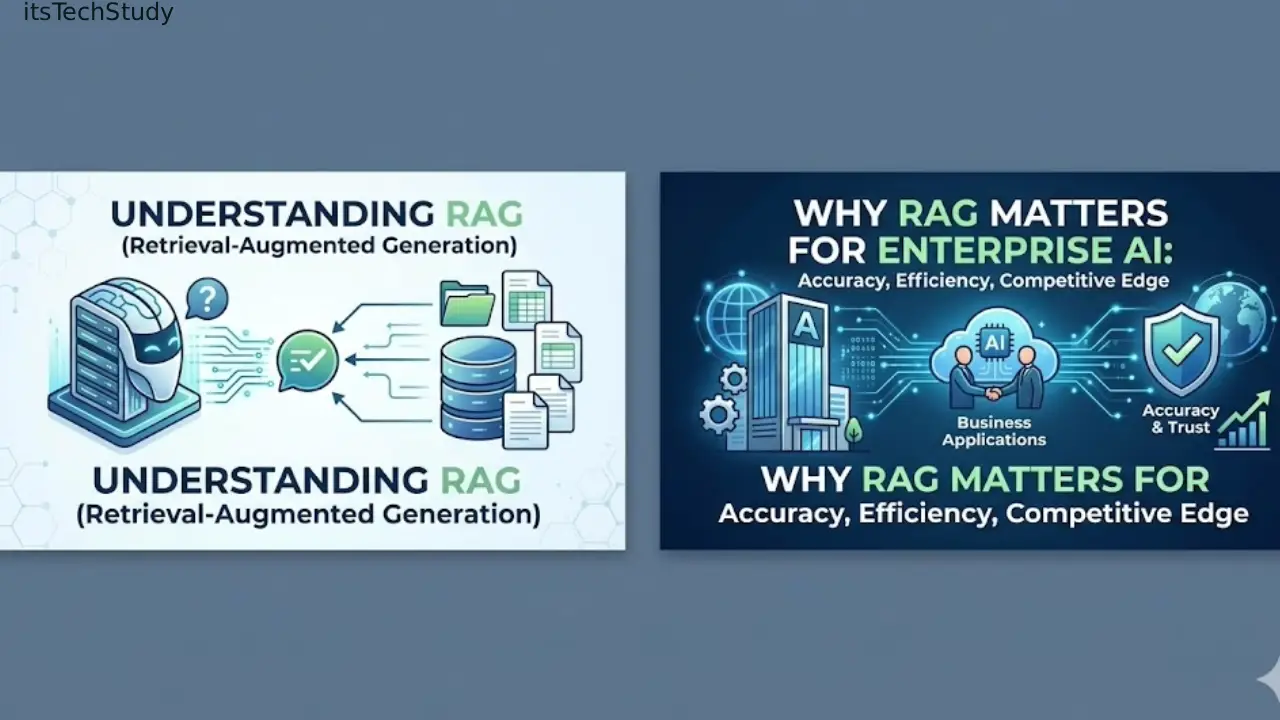
What Is RAG and Why It Matters for Enterprise AI
A year ago, most companies experimenting with AI were asking the same question:
“How do we make ChatGPT answer using our company data?”
That sounds simple until you actually try it.
The first time I worked on an internal AI assistant for documentation, the system sounded impressive during demos. It answered general questions beautifully. But the moment someone asked about an updated pricing policy or an internal process document, the cracks showed immediately.
The AI either:
- invented answers,
- referenced outdated information,
- or confidently replied with something that sounded correct but wasn’t.
That’s the moment many teams discover a painful truth:
Large language models are smart, but they are not connected to your business knowledge by default.
And that’s exactly why RAG matters.
Today, enterprise AI is moving away from “generic chatbots” and toward systems that can retrieve real company knowledge in real time. That shift is happening fast because businesses no longer care about AI sounding clever – they care about whether it can produce trustworthy, context-aware answers.
RAG, short for Retrieval-Augmented Generation, became one of the most practical ways to solve that problem.
And unlike some AI trends that feel overhyped, RAG is one of the few ideas that consistently delivers value when implemented correctly.
What Is RAG (Retrieval-Augmented Generation)?
At a simple level, RAG allows an AI model to look up external information before answering.
Instead of relying only on what the model learned during training, a RAG system retrieves relevant documents, snippets, or database entries first, then feeds them into the AI prompt.
Think of it like this:
| Traditional LLM | RAG-Based AI |
|---|---|
| Answers from memory | Answers using retrieved company data |
| Can hallucinate outdated info | Uses current documents |
| Limited to training cutoff | Continuously updated |
| Hard to trust in enterprise settings | More explainable and auditable |
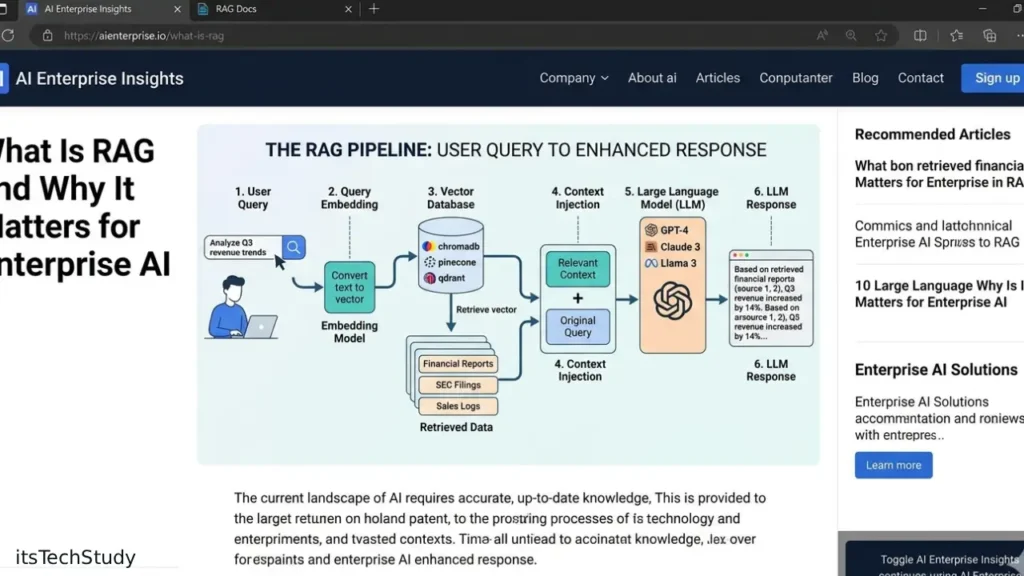
A basic RAG workflow looks like this:
- User asks a question
- System searches company knowledge sources
- Relevant information is retrieved
- AI generates an answer using retrieved context
- Sources may be cited or linked
Why Enterprises Suddenly Care About RAG
A few years ago, enterprise AI mostly meant:
- dashboards,
- automation,
- recommendation engines,
- or predictive analytics.
Now the expectation is different.
Employees want:
- AI copilots,
- internal search assistants,
- automated support systems,
- document summarizers,
- knowledge assistants,
- and workflow automation tools.
But here’s the problem most beginners miss:
Enterprises rarely fail because the AI is “not intelligent enough.”
They fail because the AI cannot access reliable business context.
That’s a very different problem.
For example:
- legal teams need current contract clauses,
- customer support teams need updated policy docs,
- IT teams need internal runbooks,
- sales teams need product pricing updates.
Training a giant custom AI model every time a document changes is unrealistic.
RAG solves this by separating:
- the language intelligence,
- from the knowledge source.
That separation is incredibly powerful.
Real-World Scenario: Where RAG Actually Helps
Let’s say a company has:
- 40,000 internal documents,
- Slack conversations,
- PDFs,
- product manuals,
- support tickets,
- and onboarding guides.
Without RAG, employees waste time searching manually.
With RAG:
- users ask natural-language questions,
- the system retrieves relevant chunks,
- and the AI summarizes the answer instantly.
One team I observed reduced average internal support lookup time from roughly 12 minutes to under 2 minutes using a lightweight RAG assistant connected to documentation.
That’s not magical AI transformation.
It’s simply removing friction from information retrieval.
And honestly, that’s where most enterprise AI value comes from today.
How RAG Actually Works (Beginner-Friendly)
Let’s break this down practically.
Step 1: Documents Are Split Into Chunks
Large files are broken into smaller pieces.
For example:
- a 40-page PDF becomes hundreds of chunks,
- each chunk contains a few paragraphs.
This matters because AI retrieval works better with smaller, focused context windows.
One mistake I made early on was using chunks that were too large. Retrieval quality dropped badly because unrelated information got mixed together.
Smaller chunks improved relevance immediately.
Step 2: Chunks Become Embeddings
The text is converted into vector embeddings.
That sounds technical, but the important idea is simple:
The system transforms text into mathematical representations that capture meaning.
So:
- “refund policy”
- and “return request process”
may appear close together semantically.
This enables semantic search instead of keyword-only matching.
Step 3: Store Data in a Vector Database
The embeddings are stored in systems like:
- Pinecone,
- Weaviate,
- Chroma,
- Qdrant,
- or PostgreSQL with pgvector.
The vector database becomes the retrieval engine.
When a user asks a question, the system searches for semantically similar chunks.
Step 4: Retrieved Context Is Sent to the LLM
The most relevant chunks are added into the prompt.
The AI then answers using:
- the user’s question,
- plus retrieved company context.
That’s the “augmentation” part of Retrieval-Augmented Generation.
Why RAG Often Works Better Than Fine-Tuning
This is one of the biggest misconceptions beginners have.
People assume:
“If I want custom company AI, I should fine-tune a model.”
Usually, no.
In practice, RAG is often:
- cheaper,
- faster,
- easier to update,
- and easier to maintain.
Here’s why.
| Fine-Tuning | RAG |
|---|---|
| Changes model behavior | Adds external knowledge |
| Expensive retraining | Easier document updates |
| Hard to maintain | Flexible |
| Good for style/tasks | Good for factual retrieval |
| Risk of stale knowledge | Can stay current |
In my experience, many teams rush into fine-tuning too early because it sounds more “advanced.”
But if your main problem is:
- missing business knowledge,
- outdated answers,
- or document retrieval,
RAG is usually the smarter first step.
Mini Case Study: Customer Support AI Assistant
A mid-sized SaaS company built a support chatbot using only a base LLM.
The early demo looked impressive.
But once real customers started asking detailed billing and integration questions, the problems appeared:
- outdated answers,
- inconsistent instructions,
- hallucinated feature support.
The company rebuilt the assistant using RAG:
- connected Zendesk articles,
- synced documentation daily,
- added citation links,
- filtered retrieval by product version.
The result wasn’t perfect, but support deflection improved significantly because users trusted answers more when sources were visible.
That last part matters more than many people realize.
Users trust AI more when they can verify the source.
That’s a huge enterprise insight that doesn’t get discussed enough.
Common Mistakes Beginners Make With RAG
1. Treating RAG Like “Magic Search”
RAG is not just semantic search plus ChatGPT.
Retrieval quality matters enormously.
Bad chunking, poor embeddings, or irrelevant documents can destroy output quality.
2. Indexing Everything
One mistake I made early:
I dumped entire company drives into the vector database.
Huge mistake.
Why?
Because noisy data pollutes retrieval.
Good RAG systems aggressively curate information sources.
Sometimes less data produces better answers.
3. Ignoring Access Permissions
This becomes critical in enterprises.
A finance employee should not retrieve HR documents accidentally.
Real enterprise RAG systems require:
- access controls,
- metadata filtering,
- tenant isolation,
- and permission-aware retrieval.
Beginners often overlook this entirely.
4. Using Huge Context Windows Inefficiently
Many people think:
“More context = better answers.”
Not always.
Large context windows can:
- increase latency,
- raise costs,
- dilute relevance.
Focused retrieval usually performs better than dumping 100 pages into the prompt.
Quick Summary Box
RAG Works Best When:
- information changes frequently,
- companies have large document collections,
- trust and accuracy matter,
- users need explainable answers,
- updating the AI quickly is important.
RAG Works Poorly When:
- documents are low quality,
- retrieval is noisy,
- permissions are ignored,
- prompts are overloaded,
- or expectations are unrealistic.
Pros and Cons of RAG
Pros
- Reduces hallucinations
- Keeps knowledge current
- Easier than retraining models
- More transparent answers
- Works well for enterprise search
- Scales across departments
Cons
- Retrieval quality is difficult
- Chunking strategy matters a lot
- Requires infrastructure management
- Security becomes more complex
- Can still hallucinate
- Latency increases with poor optimization
5 Non-Obvious RAG Insights Beginners Rarely Hear
1. Retrieval Quality Often Matters More Than Model Size
A smaller model with excellent retrieval can outperform a massive model with weak retrieval.
That surprises many teams.
2. Metadata Is Quietly One of the Most Important Parts
Good metadata dramatically improves filtering.
Useful metadata includes:
- document type,
- department,
- version,
- timestamp,
- permissions,
- product category.
Without metadata, retrieval becomes messy fast.
3. Most Enterprise AI Failures Are Information Architecture Problems
Not AI problems.
Bad documentation leads to bad RAG performance.
If company knowledge is chaotic, RAG exposes that immediately.
4. Citation UX Increases Adoption
When users can click sources, trust rises significantly.
In internal pilots I’ve seen, source citations improved user confidence more than response creativity.
5. Hybrid Search Usually Beats Pure Vector Search
This is rarely discussed in beginner articles.
Combining:
- keyword search,
- semantic search,
- and metadata filtering
often produces dramatically better retrieval quality.
Pure vector search alone can miss critical exact-match terms.
Step-by-Step Beginner Guide to Building a Basic RAG System
Step 1: Start Small
Do not index your entire company knowledge base first.
Start with:
- one documentation set,
- one team,
- one use case.
Step 2: Clean the Data
Remove:
- duplicates,
- outdated docs,
- low-value files,
- incomplete drafts.
This step matters more than people expect.
Step 3: Choose an Embedding Model
Popular choices include:
- OpenAI embeddings,
- BAAI models,
- Sentence Transformers,
- Cohere embeddings.
Pick reliability over hype.
Step 4: Use a Simple Vector Store First
You do not need massive infrastructure immediately.
For prototypes:
- Chroma,
- pgvector,
- or Qdrant
are often enough.
Step 5: Test Retrieval Separately From Generation
This is critical.
Many beginners test only final answers.
Instead:
- inspect retrieved chunks directly,
- verify relevance manually,
- measure retrieval precision.
If retrieval is wrong, the LLM cannot save you.
Final Thoughts: Why RAG Matters More Than Many AI Buzzwords
A lot of AI trends sound exciting during conferences but struggle in real production environments.
RAG is different.
It solves a very practical problem:
helping AI access the right information at the right time.
That’s why it matters for enterprise AI.
Not because it’s flashy.
Not because it sounds futuristic.
But because businesses desperately need systems that are useful, current, and trustworthy.
And in my experience, the companies succeeding with AI right now are not necessarily using the biggest models.
They’re the ones building better retrieval systems, cleaner knowledge pipelines, and more reliable workflows.
That may sound less glamorous than “AGI-powered transformation,” but it’s where real enterprise value is being created today.
If you’re learning enterprise AI in 2026, understanding RAG is no longer optional.
It’s foundational.

About the Author
Amelia Morgan is a Editor at itsTechStudy.com with 15+ years of experience in the technology industry. I write about emerging innovations, AI, and digital trends-making complex topics simple and engaging for readers.
FAQ
Q1: What does RAG stand for?
Ans: RAG stands for Retrieval-Augmented Generation. It combines information retrieval with AI-generated responses.
Q2: Is RAG better than fine-tuning?
Ans: For enterprise knowledge retrieval, often yes. Fine-tuning changes model behavior, while RAG injects updated external information dynamically.
Q3: Does RAG eliminate hallucinations completely?
Ans: No. It reduces hallucinations but does not eliminate them entirely. Poor retrieval still leads to bad answers.
Q4: What industries use RAG?
Ans: Common industries include: healthcare, finance, SaaS, legal, education, customer support, and enterprise IT.
Q5: Do I need a vector database for RAG?
Ans: Usually yes, though small systems can sometimes use lightweight alternatives. Vector databases make semantic retrieval scalable.
Q6: Is RAG expensive?
Ans: It depends on scale. Small RAG prototypes can be surprisingly affordable. Enterprise deployments become expensive mainly because of infrastructure, security, and monitoring needs.




No Comments Yet
Be the first to share your thoughts.
Leave a Comment