


A year ago, most people were still asking AI to “write an email” or “summarize this article.”
Now?
People want AI systems that can:
- Research competitors
- Read PDFs
- Search the web
- Execute tasks
- Call APIs
- Plan multi-step actions
- Remember context
- Collaborate with other agents
That’s the shift.
We’ve moved from single prompts to AI agents.
And honestly, this change happened faster than most developers expected.
The problem is that beginners often jump straight into frameworks like LangChain or CrewAI without understanding what an AI agent actually is underneath the hype.
When I first tried building an AI agent, I made the classic mistake: I over-engineered everything.
I added memory systems, vector databases, tool routing, multi-agent collaboration… before even verifying whether the core task worked reliably.
The result?
A fragile mess that looked impressive in screenshots but failed in real usage.
That experience taught me something important:
Most useful AI agents are surprisingly simple.
This guide focuses on practical reality – what actually works, what breaks, and how beginners can build AI agents from scratch without drowning in complexity.
What Is an AI Agent, Really?
A lot of articles describe AI agents in vague ways.
Here’s the simplest practical definition:
An AI agent is an LLM connected to tools, memory, and decision-making logic.
That’s it.
A chatbot becomes an “agent” when it can:
- Observe information
- Decide what to do
- Use tools/actions
- Evaluate results
- Continue until the task is complete
A normal prompt:
- “Summarize this PDF.”
An AI agent:
- Reads the PDF
- Extracts data
- Searches missing information online
- Organizes findings
- Generates a final report
- Saves memory for future use
That loop changes everything.
The Core Architecture of an AI Agent
Most beginner tutorials skip architecture completely. That’s a mistake.
Understanding the moving parts makes debugging far easier later.
Here’s the basic structure:
| Component | Purpose | Common Beginner Mistake |
|---|---|---|
| LLM | Reasoning and planning | Choosing the biggest model unnecessarily |
| Tools | APIs, search, calculator, code execution | Adding too many tools |
| Memory | Stores context/history | Using long-term memory too early |
| Orchestrator | Controls workflow | Overcomplicated agent chains |
| Evaluation Layer | Checks quality | Completely ignored by beginners |
One thing beginners rarely hear:
The orchestration layer matters more than the model in many projects.
I’ve seen smaller models outperform expensive ones simply because the workflow logic was cleaner.
Real-World Scenario: Building a Research Agent
Let’s use a realistic beginner project.
Imagine you want an AI agent that:
- Researches a topic
- Reads webpages
- Summarizes findings
- Generates a blog outline
Sounds simple, right?
In practice, this project teaches almost every important AI agent concept.
Here’s how I’d build it today.
Step 1: Start With One Narrow Task
This is where most people fail.
They try building:
- “A fully autonomous business assistant”
- “An AGI workflow”
- “A self-improving AI employee”
Don’t.
Start with:
“AI agent that researches one topic and creates structured notes.”
That’s enough.
In my experience, narrow agents are:
- Easier to debug
- More reliable
- Cheaper to run
- Actually useful
Minimal Beginner Stack
You do NOT need 15 frameworks.
A practical beginner stack:
| Tool | Why It’s Useful |
|---|---|
| Python | Best ecosystem for AI agents |
| OpenAI API or open-source LLM | Core reasoning engine |
| LangChain or lightweight custom code | Workflow orchestration |
| Vector DB (optional) | Long-term memory |
| FastAPI | Deployment |
| SQLite | Simple state storage |
Honestly, beginners should avoid Kubernetes, distributed memory systems, and complex agent swarms initially.
They create operational pain long before they create value.
Step 2: Build the Agent Loop First
The real heart of an AI agent is the loop.
Basic flow:
- Receive task
- Think
- Choose tool
- Execute tool
- Observe result
- Decide next action
- Finish
This is the core pattern behind many modern agent frameworks.
One mistake I made early:
I trusted the LLM too much.
I assumed:
“The model is smart enough to manage itself.”
Bad assumption.
Agents need structure.
Without constraints:
- They loop forever
- Use wrong tools
- Hallucinate actions
- Waste tokens rapidly
Simple Agent Workflow Example
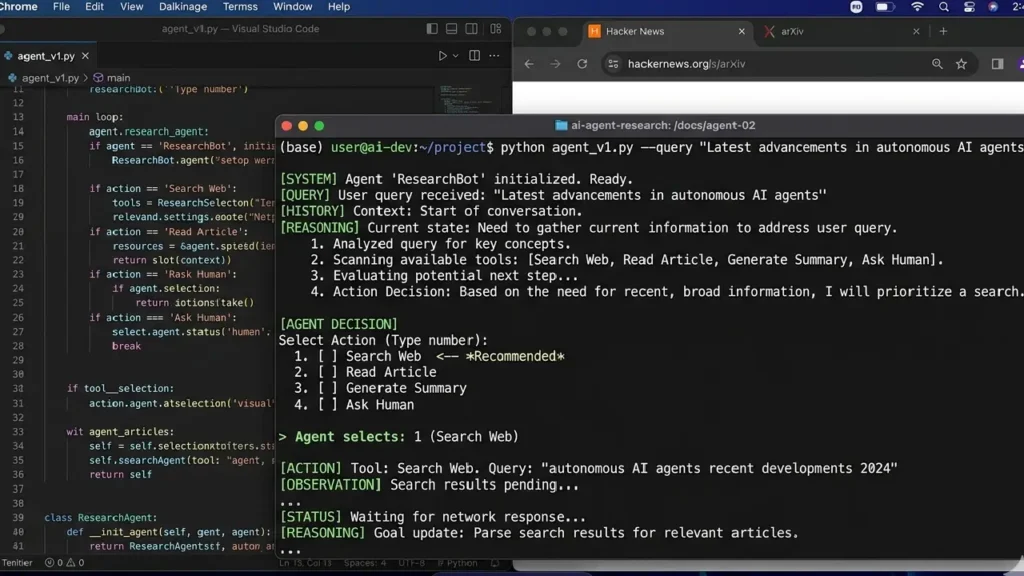
A lightweight pseudo workflow:
while not task_complete:
    analyze_context()
    select_tool()
    execute_action()
    evaluate_output()
That simple pattern powers many production systems.
Step 3: Add Tools Carefully
Tools are what make agents useful.
Common tools:
- Web search
- PDF reader
- Calculator
- Code execution
- Database query
- Email sender
- Browser automation
But here’s a non-obvious lesson:
More tools usually make agents worse initially.
Why?
Because tool selection becomes harder.
I once gave an agent 14 tools for a content workflow.
Performance dropped noticeably.
The model kept:
- Choosing unnecessary tools
- Calling APIs redundantly
- Getting confused between similar actions
Reducing the tool count to 5 improved reliability dramatically.
That’s a practical insight most tutorials ignore.
Mini Case Study: Content Research Agent
I built a small content research agent for blog workflows.
Initial setup:
- 11 tools
- Multi-agent routing
- Long-term memory
- Recursive planning
Result:
- Slow
- Expensive
- Unstable
Second version:
- 3 tools only
- Search
- Scraper
- Summarizer
Result:
- Faster
- More accurate
- Easier to maintain
- 70% lower API cost
That experience completely changed how I design agents now.
Step 4: Understand Memory (Without Overcomplicating It)
Memory is where beginners usually get trapped.
There are actually different memory types:
| Memory Type | Purpose |
|---|---|
| Short-term memory | Current conversation/task |
| Long-term memory | Persistent information |
| Episodic memory | Past actions/results |
| Semantic memory | Structured knowledge |
Most beginner agents only need:
- Conversation history
- Small task context window
That’s it.
You probably do NOT need vector memory immediately.
This is one of those truths experienced builders learn the hard way.
When Memory Actually Helps
Memory works best when:
- Tasks are repeated
- User preferences matter
- Multi-session workflows exist
- Historical context improves decisions
Memory is overrated for:
- Single-use agents
- One-off research tasks
- Simple automation
Step 5: Add Retrieval (RAG) Before Fine-Tuning
This is another huge misconception.
Beginners often think:
“I should fine-tune a model for my data.”
Usually wrong.
In most business cases:
- RAG is cheaper
- Faster
- Easier
- Easier to update
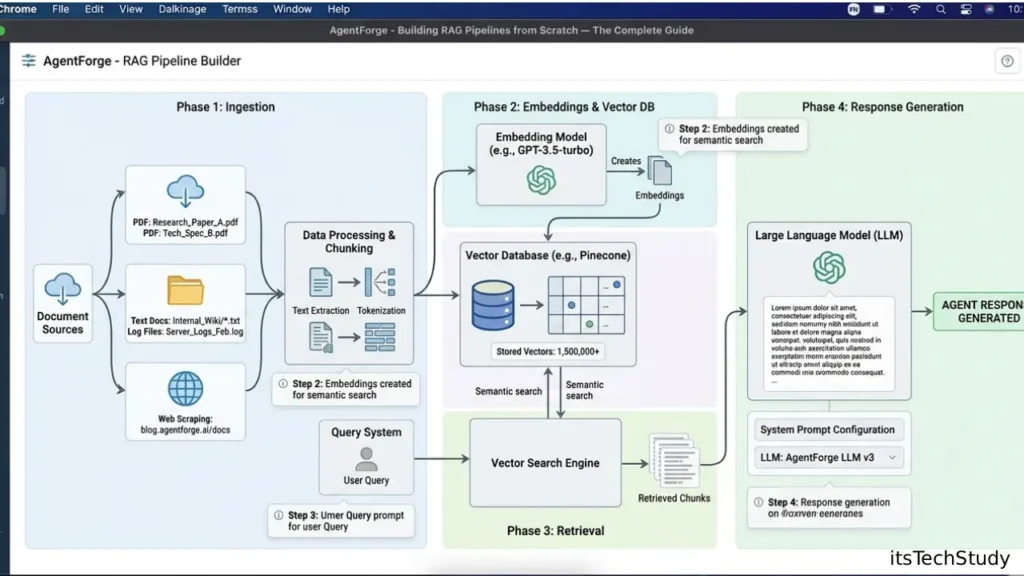
A retrieval pipeline:
- Store documents
- Embed chunks
- Retrieve relevant context
- Inject into prompts
That’s enough for many practical agents.
Pros and Cons of AI Agents
Pros
- Automate repetitive workflows
- Handle multi-step reasoning
- Reduce manual research time
- Connect multiple systems together
- Scale content and operations
Cons
- Unpredictable behavior
- Hallucinations still happen
- Tool misuse is common
- API costs can grow quickly
- Debugging is harder than normal apps
One thing people underestimate:
Agent reliability matters more than intelligence.
A slightly less capable agent that behaves consistently is usually more valuable.
Common Mistakes Beginners Make
1. Using Giant Frameworks Too Early
Frameworks are helpful later.
But early on, custom Python logic teaches you more.
When I stopped hiding behind frameworks, debugging suddenly became much easier.
2. Ignoring Evaluation
This is a massive industry problem.
People demo agents.
Very few measure them.
You should track:
- Task completion rate
- Tool accuracy
- Hallucination frequency
- Average token cost
- Retry count
Without evaluation, improvement becomes guesswork.
3. Giving Agents Too Much Freedom
Autonomy sounds exciting.
In practice, constraints improve quality.
Good production agents usually operate inside guardrails.
4. Overusing Multi-Agent Systems
This may sound controversial.
But many “multi-agent” demos could be replaced with:
- One good prompt
- One orchestrator
- Two tools
Multiple agents add:
- Coordination overhead
- Latency
- More failure points
Use them only when responsibilities are clearly separated.
5 Non-Obvious Insights Most Tutorials Skip
1. Prompt Quality Matters Less Than Workflow Design
People obsess over prompts.
But poor orchestration destroys good prompts quickly.
Workflow structure often matters more.
2. Smaller Context Windows Sometimes Improve Accuracy
This surprises beginners.
Too much context can confuse the model.
I’ve seen agents improve after reducing memory injection.
3. Tool Descriptions Are Critically Important
Tiny wording changes affect tool selection heavily.
Example:
Bad:
- “Search tool”
Better:
- “Use ONLY when external information is required.”
That single sentence can reduce unnecessary tool calls significantly.
4. Most Agent Failures Are State Problems
Not model problems.
Common issues:
- Missing context
- Bad memory retrieval
- Incorrect task tracking
- Tool response formatting
This becomes obvious once you debug real systems.
5. Reliability Beats Autonomy
The AI community loves “fully autonomous” systems.
Real businesses usually want:
- Predictable workflows
- Human approval checkpoints
- Auditable decisions
That’s far more practical.
A Practical Beginner Roadmap
If I had to start again today, I’d follow this order:
Phase 1
Build:
- Chatbot
- Tool calling
- Simple workflows
Phase 2
Add:
- RAG
- Memory
- API integrations
Phase 3
Add:
- Multi-agent collaboration
- Planning systems
- Evaluation pipelines
Phase 4
Focus on:
- Reliability
- Cost optimization
- Deployment
- Monitoring
That progression prevents overwhelm.
Quick Takeaway Box
If You Remember Only 3 Things
- Start narrow
- Use fewer tools
- Prioritize reliability over autonomy
That alone will put you ahead of many beginner projects.
Final Thoughts
AI agents are simultaneously overhyped and genuinely transformative.
That sounds contradictory, but it’s true.
The hype comes from exaggerated claims about autonomy.
The real value comes from:
- Structured workflows
- Reliable automation
- Human-assisted intelligence
In my experience, the best AI agents are not the most “magical.”
They’re the ones that:
- Fail predictably
- Stay within boundaries
- Solve one painful problem well
That’s what actually survives in production.
If you’re starting today, resist the temptation to build an AI super-assistant immediately.
Build one useful workflow first.
Then improve reliability.
Then scale complexity slowly.
That approach feels less exciting on social media – but it works far better in reality.

About the Author
Amelia Morgan is a Editor at itsTechStudy.com with 15+ years of experience in the technology industry. I write about emerging innovations, AI, and digital trends-making complex topics simple and engaging for readers.
FAQ: Building AI Agents From Scratch
Q1: Do I need advanced math to build AI agents?
Ans: No. You need: Basic Python API understanding Workflow thinking Debugging skills You can build strong beginner agents without deep ML theory.
Q2: Should beginners use LangChain?
Ans: Yes, but carefully. It speeds up development, but beginners should still understand: Prompt flow State management Tool execution Context handling Otherwise debugging becomes painful.
Q3: What’s the biggest hidden cost in AI agents?
Ans: Usually API usage and retries. Poorly designed agents can loop endlessly and burn tokens quickly. Monitoring costs early matters.
Q4: Are open-source models good enough?
Ans: Increasingly, yes. Especially for: Internal tools RAG workflows Structured automation But hosted APIs are often easier initially.
Q5: When should I use multi-agent systems?
Ans: Only when tasks genuinely need separation. Example: Research agent Validation agent Writing agent Don’t use multiple agents just because it looks advanced.
Q6: Can AI agents fully replace employees?
Ans: Not realistically in most businesses. They work best as: Workflow accelerators Research assistants Automation layers Human oversight still matters heavily.
Q7: What’s the best first AI agent project?
Ans: A research assistant or document summarizer. Those projects teach: Tool use Retrieval Prompt chaining State management Without overwhelming complexity.




No Comments Yet
Be the first to share your thoughts.
Leave a Comment